Best personal CRM for LinkedIn: 7 compared
Anna Sheronova · Updated November 13, 2026
The best personal CRM for LinkedIn depends on what you want it to fill in by itself. If your contacts live across email and LinkedIn, Dex or Mesh keep them synced in one place. If your LinkedIn work happens in messages, Kondo organizes that inbox. If you want a record of what you did on LinkedIn that your own AI can read, such as the profiles you visited and who viewed you, LinkedAsk keeps it as you browse.
Why a tracker you fill in by hand gets dropped
A spreadsheet or a notes app needs every new person and every reply typed in. I kept my own tracker in Notion and stopped, because I had to enter everything by hand. As of October 2026, LinkedIn keeps no follow-up list and no full list of the profiles you opened.
What I wanted was for my AI to already know what I did on LinkedIn and tell me what to do next, so this comparison asks two things of each tool: what it fills in from LinkedIn without you, and what your AI can read in it.
The seven at a glance
All seven can connect to your own AI, such as Claude or ChatGPT. I make LinkedAsk, one of the seven. Every fact about the other six comes from their own help or pricing pages, checked in November 2026.
| Tool | How LinkedIn data gets in | What your AI can read | Built for |
|---|---|---|---|
| LinkedAsk | Records every profile visit, reaction and invitation as you browse LinkedIn in desktop Chrome. LinkedIn's export adds earlier connections and conversations | Your LinkedIn activity: visits, reactions, invitations and who viewed you | One person |
| Dex | Sign in to LinkedIn inside the Dex app. All connections sync about daily while the desktop app runs | Contacts and notes, on the Professional plan | One person (team plan available) |
| Mesh (formerly Clay) | Connect LinkedIn in the desktop or phone app. Visiting a profile refreshes that person | Contacts and notes, read and write | One person |
| Kondo | Syncs your LinkedIn inbox | Inbox labels and notes, on the Business plan | Individuals |
| LeadDelta | Extension syncs your connections each time you open it | Your connections and notes, described as read-only, on a paid plan | Teams |
| folk | One click per profile with its extension. Messages logged per conversation | The whole workspace, read and write, on every plan | Sales teams |
| Happenstance | Upload LinkedIn's data export | A search across your network, run on credits | Individuals and groups |
- LinkedAsk
- How LinkedIn data gets in
- Records every profile visit, reaction and invitation as you browse LinkedIn in desktop Chrome. LinkedIn's export adds earlier connections and conversations
- What your AI can read
- Your LinkedIn activity: visits, reactions, invitations and who viewed you
- Built for
- One person
- Dex
- How LinkedIn data gets in
- Sign in to LinkedIn inside the Dex app. All connections sync about daily while the desktop app runs
- What your AI can read
- Contacts and notes, on the Professional plan
- Built for
- One person (team plan available)
- Mesh (formerly Clay)
- How LinkedIn data gets in
- Connect LinkedIn in the desktop or phone app. Visiting a profile refreshes that person
- What your AI can read
- Contacts and notes, read and write
- Built for
- One person
- Kondo
- How LinkedIn data gets in
- Syncs your LinkedIn inbox
- What your AI can read
- Inbox labels and notes, on the Business plan
- Built for
- Individuals
- LeadDelta
- How LinkedIn data gets in
- Extension syncs your connections each time you open it
- What your AI can read
- Your connections and notes, described as read-only, on a paid plan
- Built for
- Teams
- folk
- How LinkedIn data gets in
- One click per profile with its extension. Messages logged per conversation
- What your AI can read
- The whole workspace, read and write, on every plan
- Built for
- Sales teams
- Happenstance
- How LinkedIn data gets in
- Upload LinkedIn's data export
- What your AI can read
- A search across your network, run on credits
- Built for
- Individuals and groups
The seven tools, with pros and cons
LinkedAsk
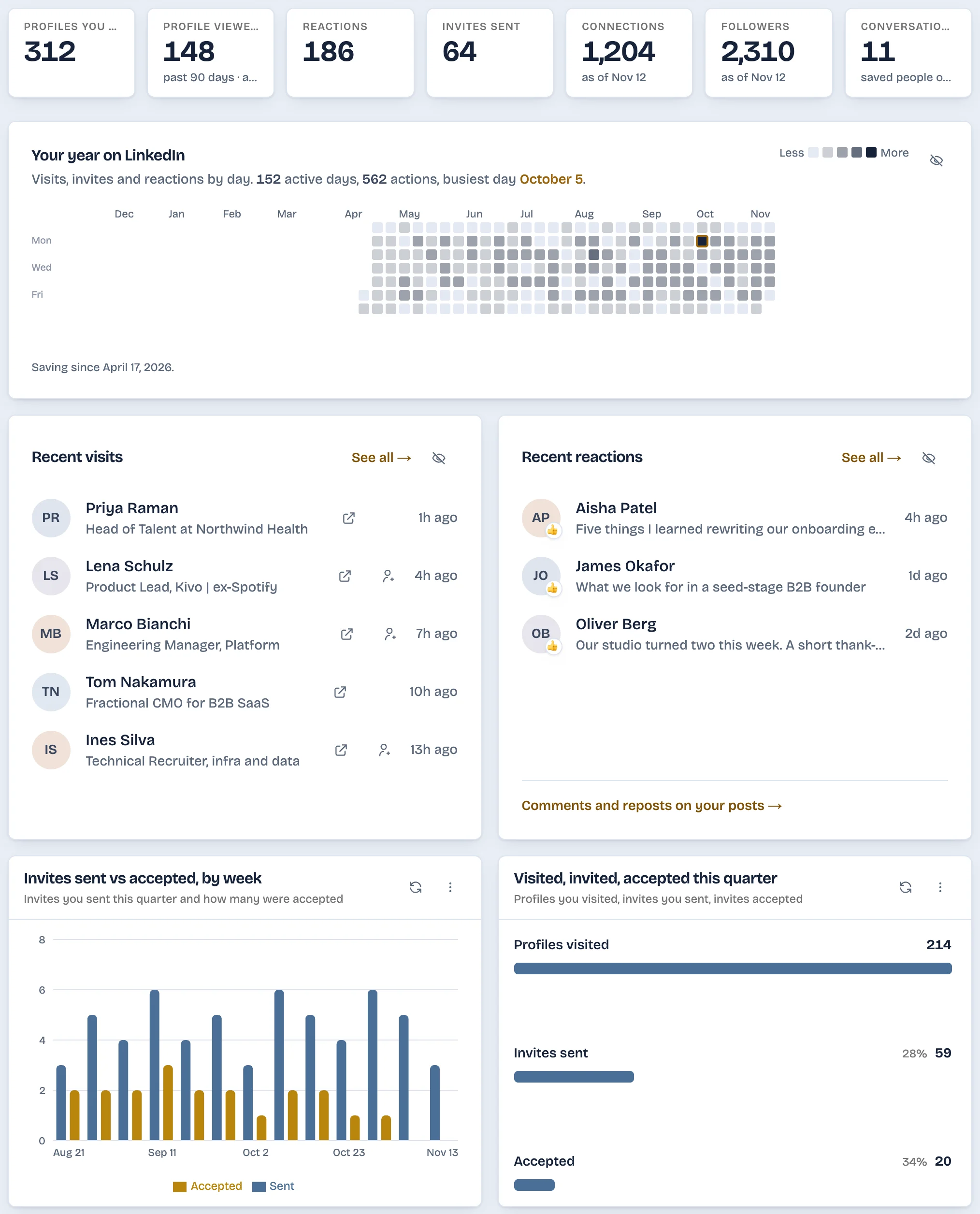
LinkedAsk is a Chrome extension that keeps a record of what you do on LinkedIn as you browse. You do not pick who to track or add anyone by hand: each person you deal with gets a history.
What it records
- Each profile you open, with the date.
- Each reaction you leave on a post.
- Each invitation you send, and whether it was accepted.
- Who viewed your profile.
- Your connections and followers, and your own posts.
Pros
- The extension collects all of this automatically, while you browse LinkedIn or in the background. There is nothing to enter by hand.
- The lowest-priced paid plan of the seven, as of November 2026. See pricing.
- Your own AI reads that history. One question I ask Claude is who recently accepted my connection request and whom I should message.
- Adding LinkedIn's data export brings in your earlier connections and conversations.
Cons
- No reminders or stages of its own, and no email or calendar. To know who to follow up with, you ask your own AI, such as Claude.
- It records in Chrome on a computer: what you do in the LinkedIn phone app is not recorded.
Suits you if most of your networking happens on LinkedIn and you want your AI to work from what you did there.
Dex
Dex is a personal CRM for every contact you have, with LinkedIn as one source. After you sign in to LinkedIn inside the Dex phone or desktop app, all your connections sync and refresh about daily while the desktop app runs, updating job titles and the last LinkedIn conversation.
Pros
- Email and calendar sit next to LinkedIn, on phone and desktop.
Cons
- The AI connection needs the Professional plan.
- The LinkedIn sync is capped by plan: up to 2,500 connections on Premium and 9,000 on Professional and Team, as of November 2026.
Suits you if you want every contact in one place on your phone.
Mesh (formerly Clay)
Mesh is a relationship app that pulls in email and messaging apps as well as LinkedIn. You connect LinkedIn from the desktop or phone app, not the browser version, and its browser extension refreshes a person when you open their LinkedIn profile.
Pros
- Free to start, and many sources besides LinkedIn in one record.
- Its AI connection reads and writes: your AI can add contacts and notes.
Cons
- Mesh says it refreshes a profile's data every few months.
- How much it imports from LinkedIn is not stated on its pages, as of November 2026.
Suits you if your network spans email and messaging apps and you want it all in one place.
Kondo
Kondo is an inbox for LinkedIn messages that now also covers other messaging apps. It syncs your LinkedIn conversations and adds labels and notes on top.
Pros
- Your LinkedIn inbox becomes something you can sort and label.
- Its AI connection reads and writes labels and notes.
Cons
- The AI connection is on the Business plan and needs Kondo open in your browser.
Suits you if your LinkedIn work happens in conversations and you want to keep up with them.
LeadDelta
LeadDelta is a LinkedIn CRM for teams that pool their networks. Its Chrome extension syncs your LinkedIn connections each time you open LeadDelta.
Pros
- Tags and notes sit in one LinkedIn workspace.
Cons
- It is built for teams sharing networks, which is more than one person needs.
- Its AI connection is on a paid plan and described as read-only.
Suits you if a small team wants one shared view of everyone's LinkedIn network. There is a longer LinkedAsk and LeadDelta comparison.
folk
folk is a CRM for tracking deals, with LinkedIn capture through its folkX browser extension. Its help center is plain about the limit: "Folk does not have a native integration with LinkedIn for automatic syncing" (folk FAQ). You add a profile with one click and log LinkedIn messages one conversation at a time.
Pros
- Its AI connection is on every plan and reads and writes the whole workspace.
- Email and WhatsApp sit next to the people you capture.
Cons
- No automatic LinkedIn import: one click per profile and per conversation.
- Priced per member and built around sales teams.
Suits you if you track deals with email and do not mind adding people as you go.
Happenstance
Happenstance is a search across the people you know, which also runs inside ChatGPT and Claude. LinkedIn gets in when you upload LinkedIn's data export: connections and who you messaged, not what was said.
Pros
- Free to start, plus Gmail and Outlook as sources.
- Its AI connection searches and researches your network from ChatGPT or Claude.
Cons
- LinkedIn arrives by uploading your export, and its page describes no refresh, as of November 2026.
- It is a network search more than a place to keep notes, and AI use runs on credits separate from its plans.
Suits you if you want to find who you know for a goal, from inside your AI chat.
Which one to pick
- Every contact current, across email and LinkedIn: Dex or Mesh.
- Your LinkedIn work happens in messages: Kondo.
- A small team pooling networks: LeadDelta.
- Tracking deals with email: folk.
- Finding who you know for a goal, inside ChatGPT or Claude: Happenstance.
- A record of what you did on LinkedIn that your AI can read: LinkedAsk.
If you would rather not add a tool, a spreadsheet works for a short list of people you are happy to type in: you can import your LinkedIn connections into Google Sheets and start from there.
LinkedIn itself keeps little of this. You can find some past profile visits and track follow-ups by hand. For the AI side, how the AI connection works explains the setup, and LinkedIn MCP servers compared goes further.
If LinkedAsk fits, install the extension once and browse LinkedIn as usual. The AI connection is set up from your account.
Personal CRM for LinkedIn: questions
What is a personal CRM for LinkedIn?
It is a tool that keeps one record per person you know on LinkedIn, filled from LinkedIn rather than typed in by hand. Some sync your connections or your inbox. LinkedAsk records what you do on LinkedIn, such as profile visits and invitations.
Which personal CRM has the best LinkedIn integration?
It depends on what you want filled in. Dex syncs all your connections about daily. LinkedAsk keeps your activity, and none of the other six lists visits or viewers on its pages, as of November 2026.
Why can't I just use LinkedIn to manage my network?
As of October 2026, LinkedIn keeps no follow-up list and no full list of the profiles you opened. You can find some past profile visits and track follow-ups by hand, but every check is manual.
Is there a personal CRM that connects to ChatGPT or Claude?
All seven in this comparison can connect to your own AI. They differ in what the AI can read: contacts and notes, an inbox, a search across your network, or your LinkedIn activity.
Is there a free personal CRM for LinkedIn?
Mesh and Happenstance can be used without paying, as of November 2026. For the other tools, check each vendor's pricing page.
Are Mesh and Clay the same app?
Yes. Clay was renamed Mesh in March 2026, so older reviews that recommend Clay are describing the same app.
Keep a record of what you do on LinkedIn
Install the LinkedAsk extension, browse LinkedIn as usual, and connect your own AI to ask who to follow up with.