How to search messages on LinkedIn itself
LinkedIn has a search bar inside Messaging, on the website and in the phone app.
- Open Messaging. On a computer, click the Messaging icon at the top of the homepage. In the app, tap it in the upper right.
- Type in the Search messages bar. You can search by keyword or by the name of the person you wrote to.
- Pick an inbox category. The dropdown switches between Focused, Other, Archived and Spam.
- Add a filter. Jobs, Unread, My Connections, Starred or InMail. The app also has Drafts. Unread means messages you have not opened, and InMail means messages from people who are not your direct connections.
That is the whole list, and none of the filters is a date, so LinkedIn cannot show you only the messages from one month or one year. For a date range, load your export into the search tool at the top of this page and drag across the map.
From LinkedIn Help, as of October 2026.
What LinkedIn's own message search leaves out
The search box in LinkedIn messaging takes a name or a keyword and returns a list of conversations. It has no date filter, no Sent folder and no way to jump to the start of a thread. If someone sent you a proposal "sometime in spring 2022", you open the chat and scroll.
Your data export holds every message in one file, messages.csv, one row each. Opened in Excel or Google Sheets it is a wall of rows, with multi-line messages breaking the grid. This page reads the same file and gives you a search box, a map and a normal chat view.
How to search your LinkedIn messages
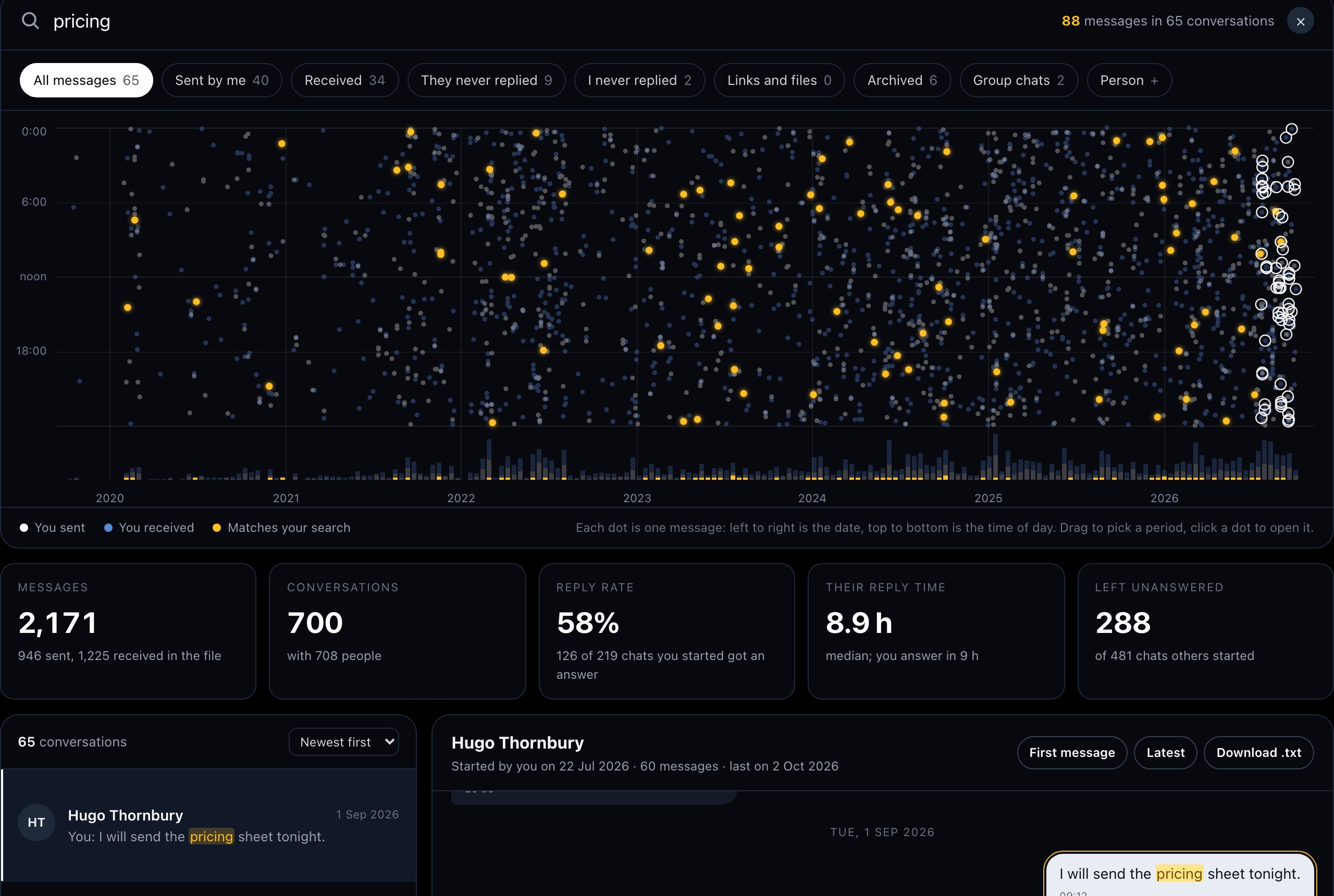
- Type anything. A word, a person, a company, or an exact phrase in quotes. Several words must all appear in the same message or its sender. Matches turn amber on the map and in the text.
- Pick a period. Drag across the map to keep only the messages from those months. This is how you search LinkedIn messages by date.
- Narrow it down. The filters show only what you sent, only what you received, conversations where the other person never replied, the ones you never answered, messages with links or files, archived threads and group chats. Person keeps the messages to and from one name.
- Read the thread. Click a result or a dot. The conversation opens at the matching message. First message jumps to the opening line, and Download .txt saves that one conversation.
How to read the message map
Each dot is one message. Its horizontal position is the date and its height is the time of day in your own time zone. White dots are yours, blue dots are other people's. Dense columns are busy weeks, like a job search or a launch. The bars along the bottom count messages per period.
| Number | How it is counted |
|---|---|
| Reply rate | Of the one-to-one conversations you started, the share where the other person wrote back at least once. |
| Their reply time | The median gap between your opening message and their first answer. |
| Left unanswered | Conversations someone else started in which you never wrote anything. |
If your real question is whose turn it is to write, the reply ledger sorts the same file by who owes a reply.
What messages.csv leaves out
The export has no read receipts, no reactions and no "seen" times, so "never replied" means there is no message in the file. Messages you deleted are gone, and people who closed their account appear as "LinkedIn Member" without a profile link. Attachments are listed as links.
The file also does not mark which person is you. The tool takes your name from Profile.csv when you drop the ZIP, or picks the person who appears in the most conversations, and you can change it next to the file name.
The same ZIP holds Connections.csv. The network map draws it by year, job function and seniority.