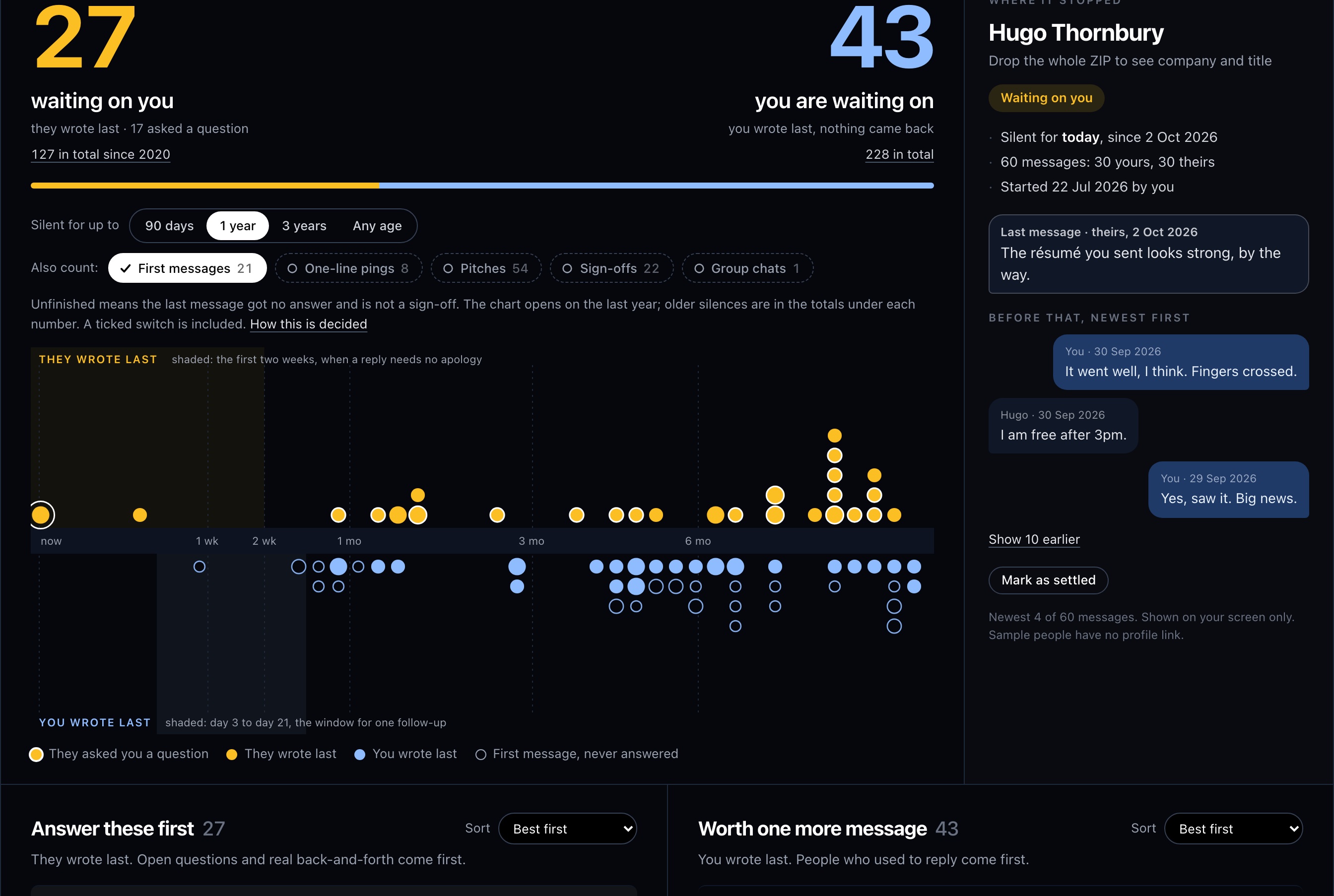
How to read the chart
LinkedIn's inbox sorts by the latest message and filters by unread. It has no view for messages you never answered, or for people who never answered you. Your data export does hold that answer: every row of messages.csv says who wrote, to whom, and when.
The tool groups the rows into conversations and looks at the last message of each. If the other person sent it, the dot sits above the line and the reply is on you. If you sent it, the dot sits below and you are the one waiting. The further right a dot is, the longer the silence. The scale is stretched so the first year takes about half the width.
- Ringed amber dots come first: their last message ends with a question.
- Bigger dots are longer conversations.
- Hollow dots are first messages that got nothing back, in either direction.
How to see who has not replied on LinkedIn
LinkedIn has no list of people who have not answered you. This is what its own screens show.
- Unread. In Messaging, the Unread filter shows messages you have not opened. Open a conversation and the unread mark is removed, whether or not you wrote back.
- The other filters. Jobs, My Connections, Starred and InMail, plus the inbox categories Focused, Other, Archived and Spam. The phone app adds Drafts. None of them means "waiting for a reply".
- Sent invitations. For connection requests, click My Network, open Manage invitations and choose the Sent tab. In the app it is My Network, then Invitations, then Sent. The tab holds the invitations you sent, and you can withdraw any that are still waiting for a response.
So for messages, the only way on LinkedIn itself is to open each conversation and look at who wrote last, which is the weekly check in tracking LinkedIn follow-ups without a spreadsheet. The chart at the top of this page makes that check for every conversation in your export at once.
From LinkedIn Help, as of October 2026.
What counts as an unanswered message
A conversation is unfinished when its last message got no answer and that message is not a sign-off. Age does not close it, but the chart opens on the last year, because a silence of five years is rarely something to act on. The line under each number gives the all-time total; click it, or Any age, to see everything.
The switches above the chart set what else counts. A ticked switch is included:
- First messages (on): someone wrote and you never replied, or you wrote and they never did.
- One-line pings (off): a single line of up to 100 characters with no question, from someone you never wrote to. "Happy birthday!" is one.
- Pitches (off): messages you never answered that have a subject line, a link, more than 320 characters, or recruiter and vendor phrasing.
- Sign-offs (off): the last message is 70 characters or fewer, has no question mark and starts like "thanks", "sounds good" or "talk soon", or is only an emoji.
- Group chats (off): any conversation with more than one other person.
LinkedIn's own notices and people shown as LinkedIn Member are never counted. These rules read the text, mostly in English, and some will be wrong. Mark as settled takes one thread out of the count until you close the tab.
The numbers under the lists
Under the two lists are your habits: the share of people who wrote first and got an answer from you, the share of your first messages that got a reply, the median time each side takes to answer, and a bar per year showing where conversations ended.
What the file does not know
The export has no read receipts and no reactions, so a thumbs-up that closed a thread in real life is missing here. Deleted messages are gone. Company and job title appear only when you drop the whole ZIP, because they come from Connections.csv. Silence is counted to the day you load the file, so an export from last month makes every gap a month longer.