Track LinkedIn follow-ups without a spreadsheet
Anna SheronovaUpdated
To track follow-ups on LinkedIn, check who wrote last in each open conversation once a week. As of October 2026, LinkedIn has no follow-up list, but the last line of a thread tells you who owes whom: they wrote last and you owe a reply, you wrote last and they owe you, or nobody has written for weeks and it went quiet. Ten minutes in Messaging with Mark as unread and Archive turns that into three short lists.
- in LinkedIn Messaging for replies you owe or are owed
- No filter
- the closest LinkedIn has to a reply to-do list
- Mark as unread
- you owe a reply, waiting on them, gone quiet
- 3 lists
"I keep forgetting who I messaged and when to follow up," one person wrote in a r/LinkedInTips thread. With 20 or 30 live conversations, the inbox already holds that record. If a conversation seems to be missing altogether, start with why LinkedIn messages disappear before you rebuild anything.
Who to follow up with
Illustration · example dataYou owe a reply2
- NLNora Lindgren2 daysAsked when your next workshop runs
- SOSamuel Okafor5 daysSent the brief you asked for
Waiting on them2
- IDInes Duarte1 weekYou shared your portfolio
- MBMarco Bellini10 daysYou asked about the open role
Gone quiet2
- MTMei Tanaka5 weeksLast talked about a referral
- EDElif Demir3 weeksAccepted your invitation, no first message
What LinkedIn gives you for follow-ups
LinkedIn's Use filters and search for messages page lists the inbox categories Focused, Other, Archived and Spam, and the filters Jobs, Unread, My Connections, Starred and InMail. None of them means "you owe a reply" or "they owe you one".
The replies you owe slip first. LinkedIn's Manage your unread messages page is clear that opening a conversation clears its unread badge, whether you answer or not. The warm reply you read on your phone in a queue looks finished on your laptop that evening.
| Tool | What it does for follow-ups | What it does not do |
|---|---|---|
| Unread filter | Shows conversations you have not opened, plus any you marked unread | Clears the moment you open a message |
| Mark as unread | Puts a conversation back in Unread so you return to it | Sets no date and sends no reminder |
| Archive | Takes a finished thread out of your list, restorable any time | Says nothing about who replied |
| Search messages bar | Finds a conversation by name or keyword | Shows no reply status |
| Read receipts | "Seen" when both people have them on | Anyone can switch them off, so a missing "Seen" proves nothing |
| Sales Navigator | An "Awaiting response" filter for InMail and private notes visible only there | Covers InMail, not your regular inbox |
As of October 2026, LinkedIn Help describes no reminder or snooze for regular member messages, so Mark as unread is the closest thing LinkedIn has to a reply to-do list.
How to track follow-ups on LinkedIn each week
Pick one slot a week and open Messaging on desktop.
- Read each conversation's last line, not the whole thread. Stop when you reach threads older than about a month. When you need the context before replying, use the Search messages bar with a name, or drop your export into the LinkedIn message search tool to find what was said.
- They wrote last: you owe a reply. If it takes two minutes, answer now. If it needs thought, hover over the conversation, click More, then Mark as unread (in the app, swipe the conversation and tap Unread). Your Unread filter is now the list of replies you owe. Opening a thread clears it again, so reply when you open it, or mark it unread again.
- You wrote last and a week or more has passed: they owe you. Write one follow-up only if you have a reason, such as news on something you discussed or a link they would want. With no reason yet, leave it for next week's pass.
- Nobody has written for weeks after a real exchange: gone quiet. Decide now. Send one message with a reason, or let it rest. People who accepted your invitation but never got a first message belong here too.
- Archive what is finished. Inside the conversation, click More, then Archive. Archived messages can be restored any time you need the thread again.
- Check Other as well. Some conversations land in Other instead of Focused, and how LinkedIn's Other inbox works explains the split.
Messaging
Illustration · example data- NLNora LindgrenMarked unread: you owe a replyOct 15Could you send me the dates for your next workshop?
- SOSamuel OkaforOct 12Here is the brief. Tell me what you think when you can.
Following up on LinkedIn after no response
Send one follow-up, with a reason to write. No study settles how long to wait with people you already know, and about a week is a common gap.
A reason beats a day count. "Just checking in" reads as a timer, while "You said the hiring plan was due this month, has it moved?" reads as attention. After that one follow-up, let the conversation rest until you have something new to say.
When a spreadsheet or CRM is the better fit
A spreadsheet goes stale when it copies your inbox: who wrote last and when are out of date by Tuesday. A sheet or CRM earns its keep when it holds what LinkedIn cannot:
- Notes LinkedIn has no place for. Where you met and what they asked for. LinkedIn keeps private notes only in Sales Navigator.
- A batch of new people at once. After an event or a launch, a sheet with one row per person is faster than ten inbox passes.
- A team. A shared pipeline needs a shared record, which a personal inbox cannot be.
- Dated reminders across channels. If you keep in touch over email and phone too, you need a tool that puts a date on each person: a calendar, or a CRM with tasks and reminders.
If none of these apply, the weekly pass is enough.
Clearing a backlog of old conversations
For months of backlog, a first pass by hand is slow. Your LinkedIn data download includes your messages, archived ones too. Drop its messages.csv into the free unanswered LinkedIn messages tool, which lists who is waiting on whom at any age. It is a snapshot as of the day you exported, so use it once to catch up, then go back to the weekly pass.
Keep the three lists without rebuilding them
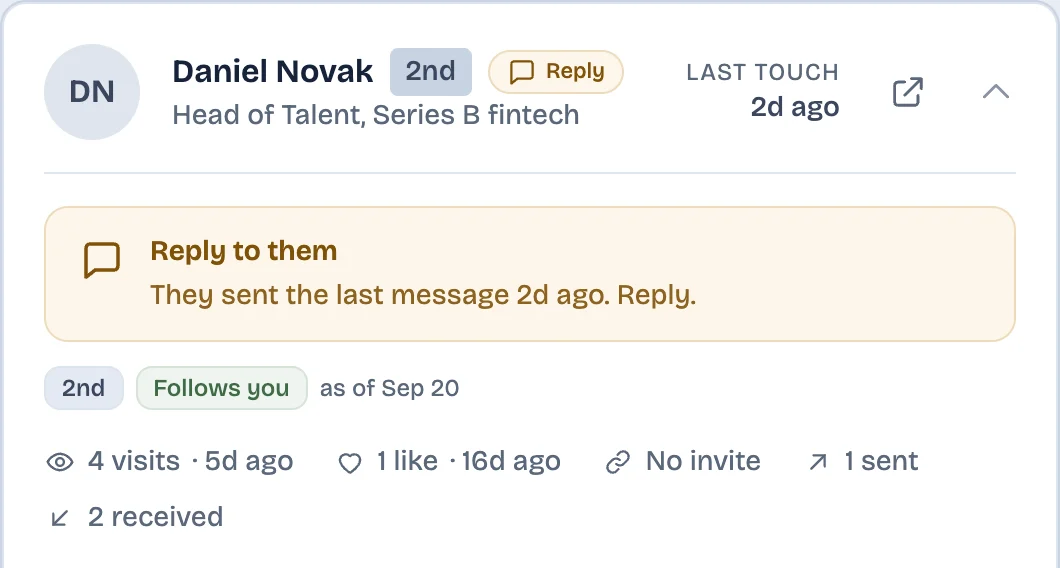
If you would rather not rebuild the lists each week, the LinkedAsk follow-up tracker sorts the people you save on its Saved page into chips: "Needs you" when the other person wrote last in the past 30 days, "Waiting on them" when you wrote last 5 to 30 days ago, and "Quiet" when nothing has happened either way for a month.
Tracking LinkedIn follow-ups: questions
Does LinkedIn have reminders for follow-up messages?
Not for regular member messages. As of October 2026, LinkedIn Help describes no reminder or snooze for them, and tags and private notes exist only in Sales Navigator. The closest native option is Mark as unread, which keeps a conversation in your Unread filter until you open it again. Dated reminders need a separate tool, such as a personal CRM.
How can I see who hasn't replied to me on LinkedIn?
LinkedIn Messaging has no filter for it, so read the last line of each conversation: where you wrote last, the other person hasn't replied. For older threads, request your LinkedIn data download, which holds messages sent, received and archived, and open its messages.csv in the free unanswered LinkedIn messages tool on LinkedAsk. It lists every conversation where you wrote last, however old.
Is it too late to reply to a LinkedIn message from weeks ago?
Usually not. Replying to a LinkedIn message from weeks ago with a short apology for the delay and a real answer tends to land better than silence.
Is Sales Navigator worth it just for follow-ups?
Only if your follow-ups happen over InMail. Sales Navigator's Awaiting response filter covers InMail, not the regular messages you trade with your connections, so it will not sort those for you.
Can I tell if someone read my LinkedIn message?
Only when both of you have read receipts on, and then the message shows as Seen. Anyone can turn them off under Settings & Privacy, Data privacy, Messaging experience, Delivery and typing indicators, and after that nobody in the conversation sees whether a message was read.
Keep reading
- Guide · 5 minLinkedIn messages disappeared? Where they wentA vanished LinkedIn conversation has usually moved to Other, Archived or Spam. Check these places in order, see what is gone for good, and keep a copy.
- Guide · 3 minCan you unsend a LinkedIn message?LinkedIn has no unsend button, but you can delete a message for everyone within 60 minutes. What they still see, and what to do once the hour is up.
- Guide · 4 minFind and restore archived LinkedIn messagesArchived LinkedIn chats are not deleted. Where to find them on desktop and in the app, how to unarchive one, and why it is still in your data export.
Know who is waiting on your reply.
LinkedAsk sorts the people you save by who wrote last, from the conversations it sees as you use LinkedIn in Chrome.