Ask Claude and ChatGPT about your own LinkedIn activity
LinkedAsk keeps a dated record of your LinkedIn activity: who viewed you, whom you visited, your invites and who accepted. Connect it to Claude, ChatGPT, Cursor or Claude Code and ask about it in the chat you already use.
Your AI assistant today
Who viewed my LinkedIn profile this month?
I can’t see your LinkedIn account, so I don’t know who viewed your profile. You could open the “Who viewed your profile” page on LinkedIn and paste the names here.
With LinkedAsk connected
Who viewed my LinkedIn profile this month?
LinkedAsk · list_profile_viewers
LinkedAsk has 12 viewers saved for September. The five most recent:
- PRPriya RamanHead of Talent at Northwind Health2h ago
- JOJames OkaforPartner at Brightline Ventures1d ago
- LSLena SchulzProduct Lead, Kivo | ex-Spotify2d ago
- TNTom NakamuraFractional CMO for B2B SaaS3d ago
- APAisha PatelContent Lead at a design tool1w ago
What is the LinkedAsk MCP server?
The LinkedAsk MCP server lets an AI assistant read the LinkedIn activity LinkedAsk has recorded for your account: people who viewed your profile, profiles you visited, invitations you sent and whether they were accepted, reactions you gave, followers and connections LinkedAsk has seen, message dates with people on your watchlist, and headline stats. You add one URL, https://linkedask.me/api/mcp, to Claude, ChatGPT, Cursor or Claude Code, then sign in to LinkedAsk and approve access. The assistant reads only your own LinkedAsk data. If you allow it when connecting, it can also save and edit charts on your LinkedAsk dashboard.
Updated September 2026.
Connect in three steps
Copy your server URL
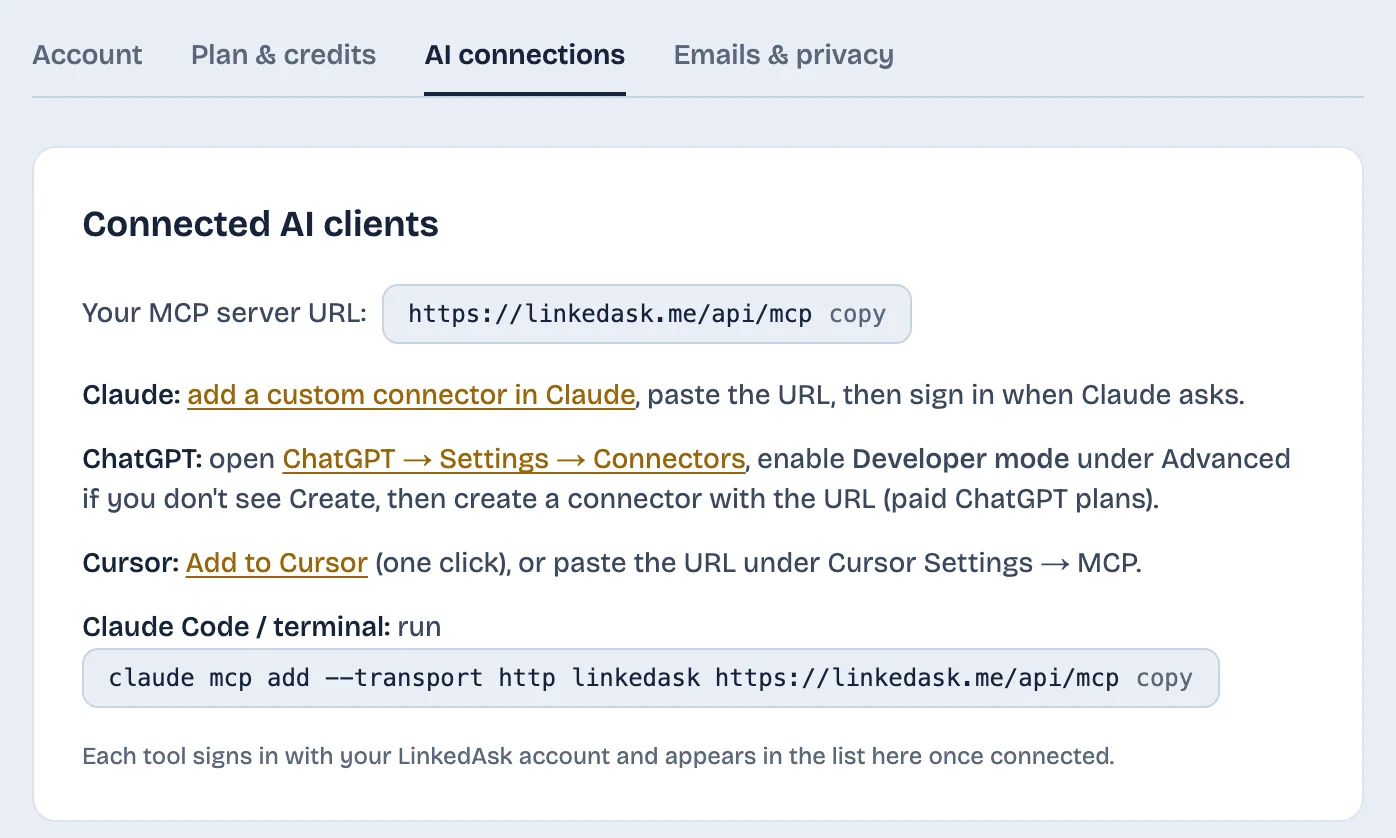
In LinkedAsk, open Settings, then AI connections, and copy the URL. It is the same for everyone: your sign-in decides whose data it reads.
Paste it into your AI tool
Claude: add a custom connector. ChatGPT: Settings, Connectors, Create (turn on Developer mode if you don’t see Create). Cursor: one click on Add to Cursor. Claude Code: run the command below.
Sign in and allow access
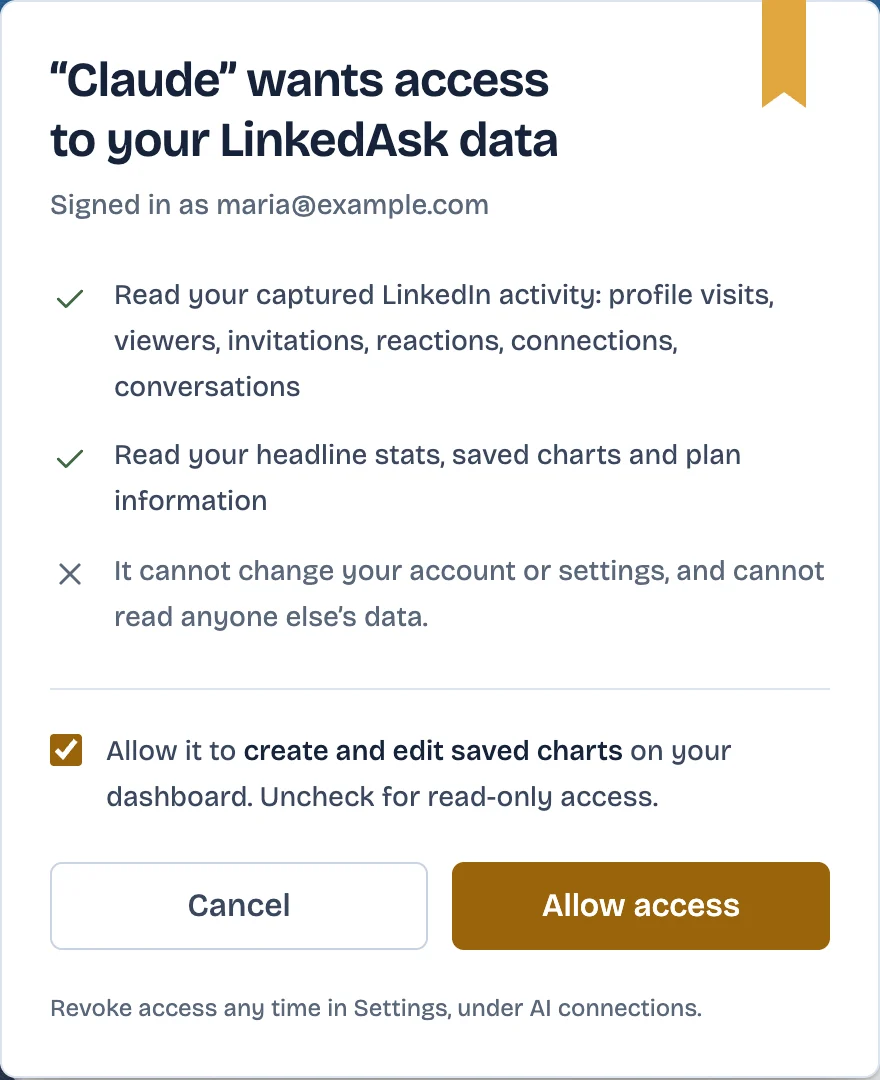
Your AI tool opens a LinkedAsk page. Sign in, check what it can read, and click Allow access. No keys to copy or keep.
- MCP server URL
https://linkedask.me/api/mcp- Claude Code
claude mcp add --transport http linkedask https://linkedask.me/api/mcp
What you can ask
Your AI assistant
Which invites I sent in August are still pending?
LinkedAsk · list_invites_sent
Three of them are still pending:
- DNDaniel NovakHead of Talent, Series B fintechAug 12
- ECElena CostaVP Sales EMEA at RelayworkAug 19
- CDClara DuboisChief of Staff to the CEOAug 27
Ask in plain words
Who viewed my profile this week? Which invites from last month are still pending? Whose profiles did I visit twice? Your assistant picks the right data and answers with names and dates.
You approve what it can do
Before anything connects, LinkedAsk shows what the tool can read. The chart box lets it save and edit charts on your dashboard; untick it and the connection only reads.
See and disconnect every tool
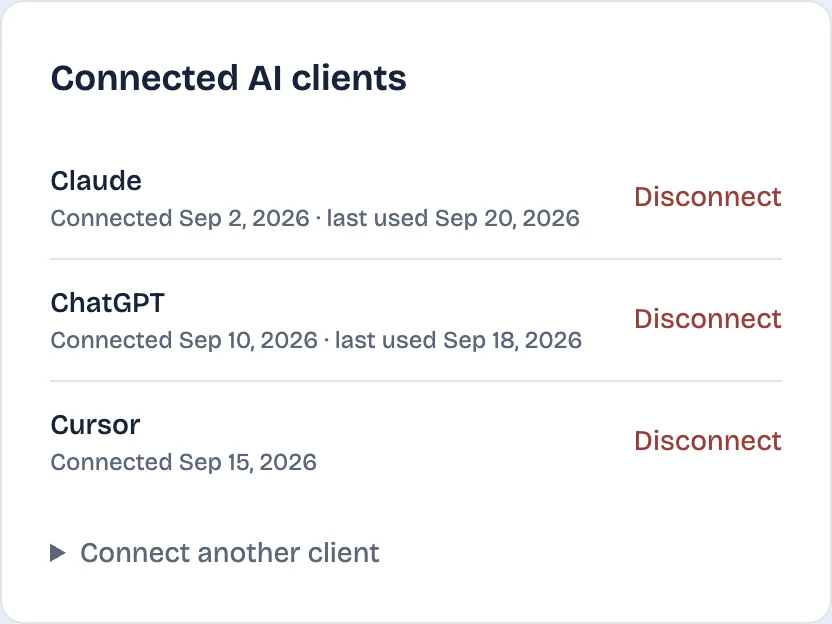
Settings lists each connected tool with the day you connected it and when it was last used. Disconnect cuts its access straight away.
Your assistant with and without LinkedAsk
| Your assistant on its own | With LinkedAsk connected | |
|---|---|---|
| Who viewed your profile | Only what you paste in | Every viewer LinkedAsk saved, with dates |
| Profiles you visited | Only what you paste in | Each visit, with the date |
| Invites you sent | Only what you paste in | Each invite, accepted or pending |
| Reactions you gave | Only what you paste in | Each reaction, with the post and date |
| Setup | Nothing to set up | Paste one URL, sign in |
What it cannot do
- It reads only what LinkedAsk has recorded. Activity from before you installed the extension, or pages you never opened, is not there.
- Messages: only dates and a short preview, and only for people on your watchlist. It does not read your inbox.
- Connections and followers: only the people LinkedAsk has seen, so counts can be below LinkedIn’s totals.
- It cannot look up other people’s profiles or search LinkedIn.
- It needs an AI tool that can add a remote MCP server by URL and sign in to it.
Bring your own AI: questions
Is there an official LinkedIn MCP server?
LinkedIn does not publish one (as of September 2026). LinkedAsk’s server gives your AI tool the LinkedIn activity LinkedAsk has recorded for your own account.
How do I connect LinkedIn to Claude?
Copy your server URL from LinkedAsk Settings, AI connections. In Claude, add a custom connector and paste the URL. Claude opens a LinkedAsk page where you sign in and click Allow access.
Does it work with ChatGPT and Cursor?
LinkedAsk Settings has steps for both. In ChatGPT, create a connector under Settings, Connectors (turn on Developer mode if Create is missing). In Cursor, use the Add to Cursor link or paste the URL under MCP settings. Claude Code takes one command.
Can the AI change anything in my account?
It can read your LinkedAsk data. If you leave the chart box ticked when you connect, it can also save, edit and delete charts on your LinkedAsk dashboard. Untick it and the connection only reads. It cannot change your account or settings.
How do I disconnect Claude or ChatGPT?
Open Settings, AI connections, and click Disconnect next to the tool. Its access stops straight away.
Does it use my LinkedAsk AI chat credits?
No. Your AI tool does the thinking; LinkedAsk only returns the data it asks for.
Give your AI your LinkedIn history
Install the extension, use LinkedIn as usual, then connect the assistant you already use.