Can I search my LinkedIn connections by company?
Yes, in two ways. On LinkedIn, type the company name in the search bar, switch the results to People, set Connections to 1st and pick the company under Current companies. You get the first-degree connections who list that employer today.
That works for a quick check. LinkedIn shows ten results per page, has no export, and leaves out the date you connected with each person. A list of twenty target companies means twenty searches and a lot of copying into a spreadsheet.
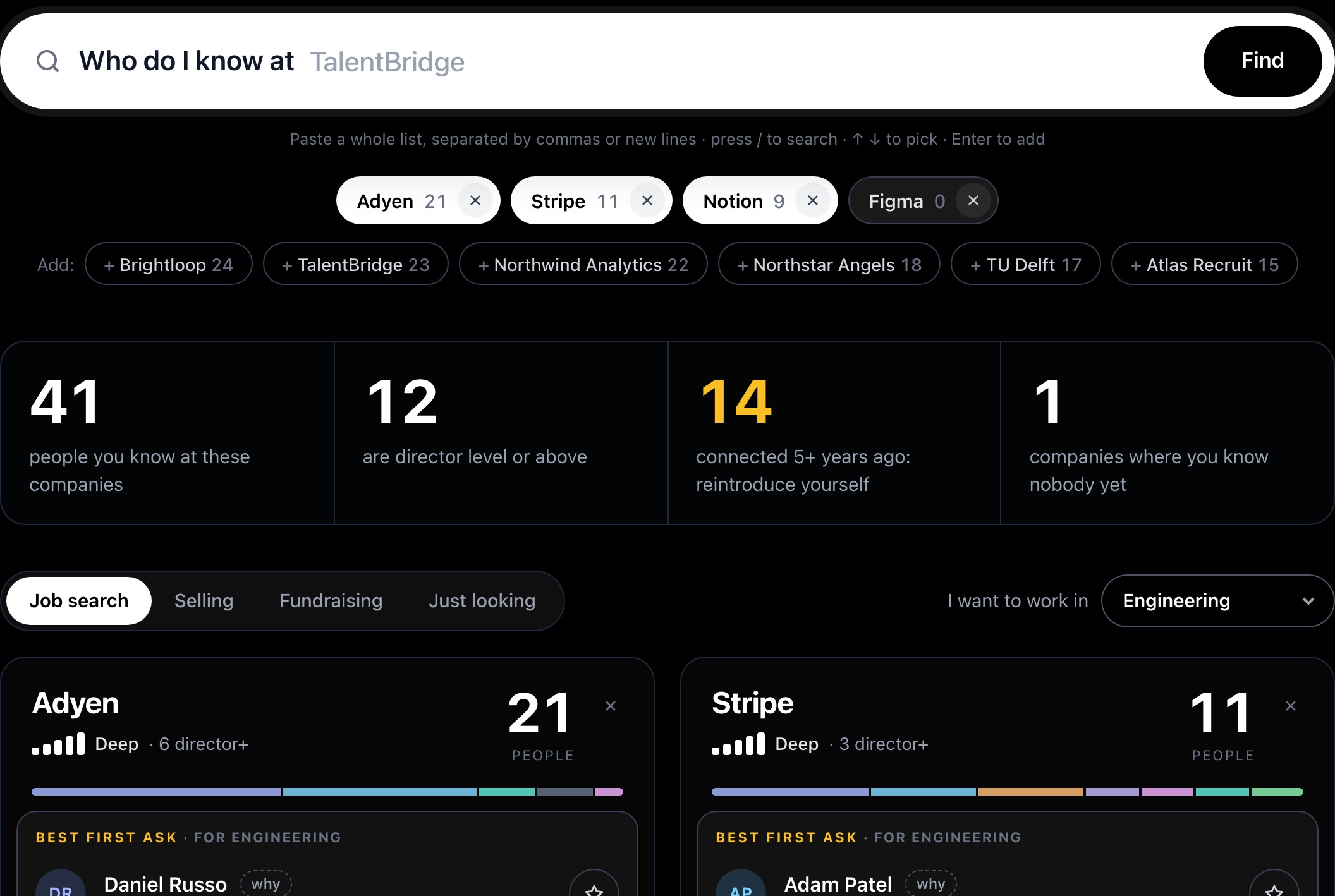
This page runs the same search on your own data export. Type or paste as many companies as you want and every match appears at once, with title, guessed seniority and the date you connected.
How many connections do I have at a company?
Each company card counts your first-degree connections whose Company column names that employer. The tool cleans names before counting: "Stripe, Inc." and "Stripe" count as one company, and so do "Brightloop B.V." and "Brightloop". The card lists the spellings it merged.
Some companies go by more than one name. Searching Meta also finds people who still list Facebook, Google picks up DeepMind and Alphabet, and AWS counts under Amazon. Subsidiaries with their own names stay separate, so search those as well.
The meter next to the count weighs how many people you know there against how senior they are. One director fills more of it than one intern, and a group with a director or VP in it reads as deep.
Company shows each person's employer on the day you downloaded the archive. Someone who left last month and kept their old profile still counts under the old company.
Who should I ask first at a company?
Pick a goal above the results and the tool re-ranks everyone at every company. Each card names a best first ask, with a reason taken from that person's row, such as "Director in Product, connected 2 years ago". Open why next to anyone to see the points behind their place.
- Job search: people in the field you pick come first, then recruiters, then managers and directors in that field who could hire you or refer you.
- Selling: founders, C-level, VPs and directors rank highest, with extra weight for the team you sell to.
- Fundraising: investors first, partners above associates, then founders who have raised before.
- Just looking: everyone, newest connection first.
Inside each goal, a more recent connection wins a tie. Anyone you connected with more than five years ago gets a "reintroduce yourself" note. Open with how you met and they will place you faster.
How do I export my connections at a company?
Star anyone to add them to your target list. Reorder it, write a note per person, then download a CSV with name, company, title, function (with any second function), seniority, connection date, profile link and your note. Or copy the list as plain text.
Each person on the list gets a draft message in three tones: a warm reconnect, a referral ask, or a request for 15 minutes. The draft fills in their first name, their company and how long ago you connected. You copy it, edit the parts in brackets and send it yourself on LinkedIn.
Want the whole network instead of a few companies? The network map draws every connection from the same file by year, job function and seniority.
Why can't I see second-degree connections at a company?
Connections.csv lists your first-degree connections only. It has no second-degree people and no record of who knows whom, so no tool built on it can suggest an introduction through a friend. When a card shows nobody, run LinkedIn's own search with Connections set to 2nd to see who your connections know there.
Titles and companies are what each person typed on their profile. Function and seniority are guesses from keywords in the title, in English, Dutch, Russian, German, French and Spanish: "Head of Talent" counts as Recruiting at director level, "Diëtist" as Health & coaching, and a title like "Making things happen" stays unclassified. A title with two roles, like "Co-founder & CTO", gets a main group and an "also" group, and the person ranks under both.