LinkedIn MCP: what it is and what it can read
Anna SheronovaUpdated
A LinkedIn MCP is a connector that gives an AI assistant such as Claude or ChatGPT access to LinkedIn data, and sometimes to LinkedIn actions. LinkedIn has not published an MCP server. It does have an app inside ChatGPT for looking up other professionals, which works only in ChatGPT. The servers you can add come in six kinds, sorted by where their data comes from, and that source sets what your assistant can read and do.
MCP in plain words
MCP stands for Model Context Protocol. Its official site defines it as "an open-source standard for connecting AI applications to external systems" and compares it to a USB-C port. You paste a server address into your assistant and sign in once. After that the assistant can call the server's tools while you chat. Ask "who viewed my profile this week?" and it calls the matching tool and writes its answer from the result.
A LinkedIn MCP server is one such set of tools, and its developer chooses which tools to include. Some servers only read. Others can also post or send messages from your account.
Is there an official LinkedIn MCP?
No. LinkedIn built an app inside ChatGPT for looking people up. You see a professional's title, company, location and follower count, then tap through to their profile. Its page describes no access to your own activity, such as who viewed you or which invitations you sent.
LinkedIn has no connector in Claude's connector directory as of October 2026, so any LinkedIn connector you add to Claude comes from another developer. Can ChatGPT access LinkedIn goes through each route by assistant.
Six places a LinkedIn MCP gets its data
Each row below is one kind of server, grouped by data source.
| Data source | What it can read | What it can change or send | Setup |
|---|---|---|---|
| A workflow tool that posts to LinkedIn | Depends on the tool. One lists your profile, your posts and page statistics, another lists no read tools. | Publishes posts. Some tools also comment and delete posts. | Hosted by the tool's maker. Some need code to set up. |
| Your browser session | Profiles, companies, jobs, your feed and your inbox | Some servers send or accept connection requests and send messages | On your computer, from the command line, Docker or a desktop app bundle |
| A hosted service that runs your account | Lead searches, profiles and your conversations | Sends messages from your account | Hosted. You connect your LinkedIn account to the service. |
| A data platform | Profile information, company details, and the email addresses and mobile numbers it finds | No sending tools listed | A remote URL or a local install, with an account on the platform |
| A Sales Navigator session | Lead searches with filters, lead profiles and your lead lists | Sends InMail and saves leads to lists | On your computer, with your Sales Navigator login |
| A record of your own activity | Profiles you visited, your viewers, invitations and acceptances, connections, followers, reactions, your posts, threads with saved people | Saves people and notes, and creates, edits and deletes charts on your LinkedAsk dashboard. | Hosted. Paste one URL and sign in. |
A record of your own activity is the odd one out. The other five fetch from LinkedIn or a data service when you ask, so they see what is there today. A workflow tool built on LinkedIn's official API gets what LinkedIn opens to outside apps, and the one checked for this guide lists your profile, your posts and page statistics among its read tools. A browser-session server opens LinkedIn as you and reads the pages you could open yourself. A record answers from what it wrote down while you used LinkedIn, so it can count views and visits that LinkedIn has since dropped.
Your own LinkedIn history in your AI
LinkedAsk belongs to the last row. You install its Chrome extension, and from then on it writes down your LinkedIn activity as you go: the profiles you open, the people who view you, the invitations you send and which were accepted, your reactions, your posts, the connections and followers it sees, and message threads with people you save. Connect LinkedAsk to Claude, ChatGPT, Cursor or Claude Code by pasting https://linkedask.me/api/mcp into the assistant and signing in. In ChatGPT that takes a Business or Enterprise/Edu plan for full access, and Pro connects for reading only. Your assistant then puts its questions to LinkedAsk, which answers from your record.
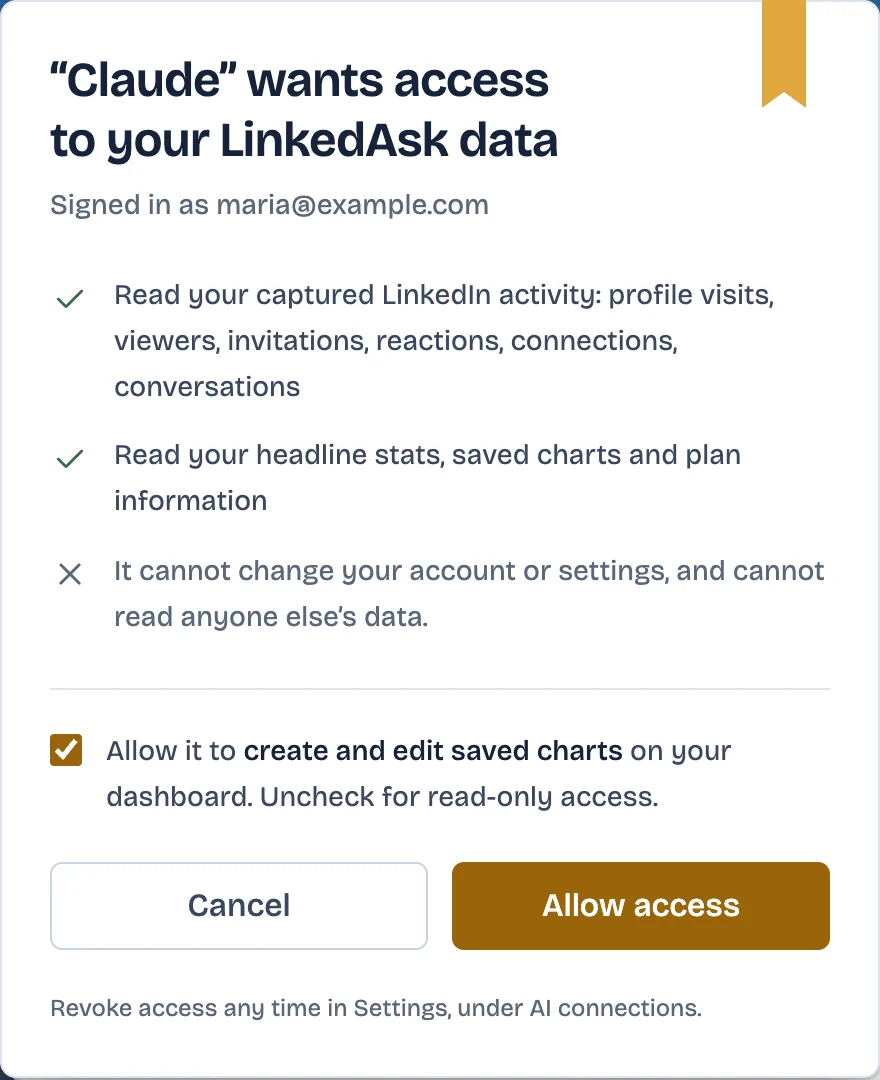
The consent page lists what your assistant will read. If the assistant asks to make changes, you get up to two boxes. The first, ticked by default, covers saved charts on your dashboard. It says create and edit, and the same permission also lets the assistant delete a saved chart. The second, unticked by default, allows saving people and editing your notes. Untick the first, leave the second empty, and the connection can only read. In LinkedAsk Settings, under AI connections, you see each assistant with the day you connected it and the day it was last used, and you can cut one off with Disconnect.
It suits questions LinkedIn has no page for, like "Who viewed my profile more than once this month?" or "Whose profiles did I open twice and never invite?" LinkedAsk also offers four ready-made prompts: today's follow-ups, a weekly review, how your recent posts did, and people showing interest whom you have not saved yet. Prompts you can paste yourself are in AI prompts for your LinkedIn network, with packs for warm introductions and network analysis.
What no LinkedIn MCP can give you
- Viewers from before a record started. LinkedIn shows a free account its three most recent viewers in the last 90 days, and Premium gets 365 days. None of the live servers covered here lists a profile viewers tool. A record holds each view from the day you installed it, and nothing older.
- Viewers in private mode. LinkedIn hides their names from free and Premium accounts alike, so no server receives them.
- Profiles you visited before you started recording. LinkedIn shows you no list of them, as see profiles you visited on LinkedIn explains.
- Another member's private data, such as their inbox or who viewed them.
Pick by job
- Publish posts from the chat: a workflow tool that posts to LinkedIn.
- Research people, companies and jobs, or work your inbox: a browser-session server, or a hosted service if you would rather not run anything on your computer.
- Build prospect lists with email addresses: a data platform. If you sell from Sales Navigator, a server on your Sales Navigator session.
- Ask about your own history, such as who viewed you and who accepted your invitations: a record of your own activity.
- Look at your network once, without a server: upload your LinkedIn export to ChatGPT.
LinkedIn MCP servers compared names the servers of each kind, with their tools and setup.
Adding a LinkedIn MCP to Claude or ChatGPT
In Claude, a hosted server goes in as a custom connector. Claude's help center lists custom connectors on the Free, Pro, Max, Team and Enterprise plans, with one custom connector for Free users. Go to Customize, then Connectors, click Add, then Add custom connector, enter a name and the server URL, sign in and click Add. On Team and Enterprise plans, Owners and Primary Owners add it first, and on Enterprise so can people whose custom role includes Manage access to Libraries. The full walk-through is in connect Claude to LinkedIn.
In ChatGPT, OpenAI lists custom MCP servers for Business and Enterprise/Edu on the web, as of October 2026, and Pro can connect them for reading only. You add one from Plugins with the plus button and Add custom MCP server, and in a Business workspace only admins and owners can create it. Steps are in connect ChatGPT to LinkedIn.
Open-source browser-session servers install on your own computer. You add them to a desktop app or a coding tool, such as Claude Desktop or Cursor, rather than to an assistant in your web browser.
LinkedIn MCP: questions
Does LinkedIn have an official MCP server?
LinkedIn has not published one, as of October 2026. It does have an app inside ChatGPT for looking up other professionals by title, company, location and follower count. The LinkedIn MCP servers you can add yourself are third-party.
Is there a Claude MCP for LinkedIn?
Yes, you add one as a custom connector. In Claude, go to Customize, then Connectors, click Add, then Add custom connector, and paste the server's URL. Claude's help center lists custom connectors on the Free, Pro, Max, Team and Enterprise plans, with one for Free users.
Can I use a LinkedIn MCP with ChatGPT?
On ChatGPT Business and Enterprise/Edu, yes. OpenAI lists full custom MCP support there as of October 2026, and in a Business workspace admins and owners add the server. Pro users can connect custom MCP servers with read and fetch permissions only. LinkedIn's own app in ChatGPT is separate and looks people up.
Do I need to code to use a LinkedIn MCP?
Most hosted servers take a URL and a sign-in, with no code. Some workflow tools expect code to create the connection. Open-source browser-session servers run on your computer, installed from the command line, with Docker or as a desktop app bundle.
Can a LinkedIn MCP show who viewed my profile?
None of the live servers covered in this guide lists a profile viewers tool in its documentation. A server that keeps a record, such as LinkedAsk, answers from each view it recorded since you installed it. LinkedIn itself shows a free account the three most recent viewers from the last 90 days.
Keep reading
- Guide · 3 minFind warm introductions on LinkedIn with AIPrompts that find who you know at a company, rank them by your last message, and draft the request, with the LinkedIn data each prompt reads.
- Guide · 4 minWho to follow up with on LinkedIn: AI promptsPrompts that rank who to message on LinkedIn today, from replies you owe to profile viewers worth a hello. Each one says what data it needs and where to get it.
- Guide · 3 minChatGPT prompts for networking on LinkedInPrompts for ChatGPT and Claude that run on your own LinkedIn data: who to follow up with, warm intros, a weekly review. Each one says what data it needs.
Put your LinkedIn history in your AI.
Install the LinkedAsk extension, then add one URL to Claude, Cursor or Claude Code, or to ChatGPT on plans with custom MCP servers.