ChatGPT and LinkedIn: connect your own data
Anna SheronovaUpdated
LinkedIn's app in ChatGPT is for looking up other professionals. To ask about your own LinkedIn history, such as who viewed your profile this week, you add a record of it as a custom MCP server under Plugins. OpenAI gives Business and Enterprise/Edu users full MCP and lets Pro users connect a server with read access, which is enough for questions about your history. LinkedAsk is the server this guide sets up.
Three ways ChatGPT and LinkedIn meet
Most people try one of the three routes below. You can also compare every kind of LinkedIn server, including the ones built for posting.
| Route | What ChatGPT sees | How you set it up |
|---|---|---|
| LinkedIn's app in ChatGPT | Another professional's title, company, location and follower count, with a link to their profile. | LinkedIn built it, and you find it among ChatGPT's plugins. |
| A file you upload | Whatever the file holds, such as the connections list from your LinkedIn data export. | Attach the file to a chat. |
| LinkedAsk as a custom MCP server | Your profile visits, viewers, sent invites, reactions and post numbers, from the day you install the extension. | Plugins, with full MCP on Business and Enterprise/Edu. Pro connects read-only. |
LinkedIn built its app for checking someone before you meet them. OpenAI's page for the app gives examples such as an attendee brief and a speaker's background. If vetting people is your goal, install it from Plugins and skip the rest of this guide.
A file suits a one-off look at your network. Your LinkedIn data export includes a connections list that ChatGPT can sort by company or year, and upload your LinkedIn export to ChatGPT walks through it. The export holds no profile views and stops on the day you downloaded it.
Add LinkedAsk to ChatGPT
Install the LinkedAsk Chrome extension before you start. It keeps a record of your LinkedIn activity in desktop Chrome, and ChatGPT reads that record through the plugin. OpenAI's help calls these custom MCP servers and has you install each one as a plugin, and some guides call them connectors. This guide says plugin from here on.
OpenAI's help article on custom MCP servers gives Business and Enterprise/Edu users full MCP, as of October 2026, and lets Pro users connect custom servers "with read/fetch permissions". The article does not list Plus or Free. On Pro every question in this guide works except saving a chart, so clear the charts box in step 4. In a Business workspace only an admin or owner can create and publish the plugin. Members then install it and start at step 4.
- Open Plugins. On ChatGPT web, go to Plugins and select the plus button, then Add custom MCP server.
- Fill in the form. Type
LinkedAskas the name. Under Connection, pastehttps://linkedask.me/api/mcp. Set authentication to OAuth, the method LinkedAsk uses to sign you in. - Create the plugin. Tick I understand and want to continue, then select Create as a plugin. ChatGPT shows the tools it found.
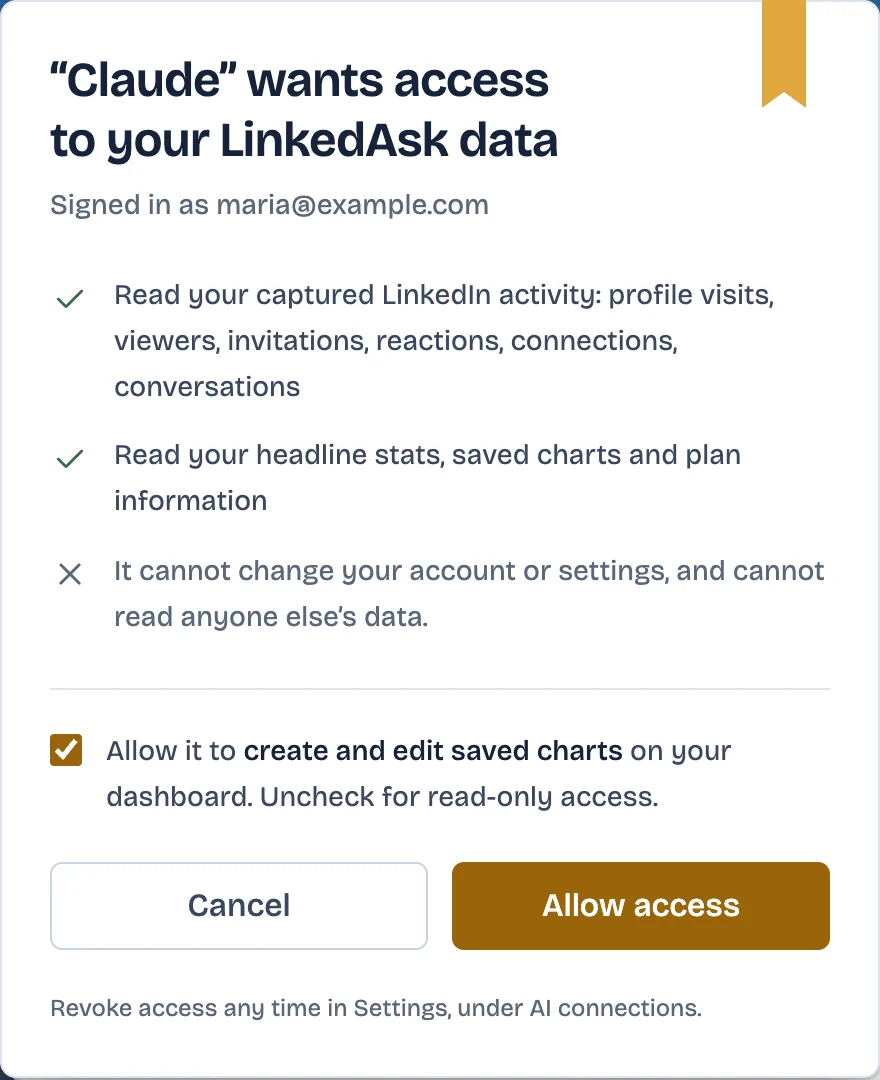
- Sign in to LinkedAsk. Install the plugin and sign in on the LinkedAsk page ChatGPT sends you to. Look over the access list, then click Allow access. On Pro, clear the charts box first.
- Ask with @. Open a new conversation, type @ and pick LinkedAsk.
- 1PluginsChatGPTPlugins+Add custom MCP serverCalendar · InstalledFiles · Installed
- 2Add custom MCP serverChatGPT✓I understand and want to continueCreate as a plugin
- 3Type @ and pick the pluginChatGPT@LinkedAsk which invites I sent in August are still pending?Used LinkedAsk
list_invites_sent- 1Dan DemoProduct lead · sent Aug 12
- 2Eve TestcaseRecruiter · sent Aug 19
- 3Hal DummySales engineer · sent Aug 27
On Plus or Free, use Claude instead: it accepts the same URL as a custom connector on any of its plans, and connect Claude to LinkedIn has the steps. The bring your own AI page shows what the connection does once it runs.
Settings › AI connections in LinkedAsk shows when ChatGPT last used the connection. Click Disconnect there to end its access straight away.
First questions to ask
Put @LinkedAsk at the start so ChatGPT calls the plugin, and give the extension a few days of normal LinkedIn use first.
- "Who looked at my profile in the last few days?" ChatGPT lists the viewers LinkedIn showed you, with LinkedIn's rough time for each.
- "How many people accepted my invites this week, and who is still pending?" Each invite the extension saw you send comes back with its status.
- "Who did I check out more than once but never asked to connect?" This one matches your profile visits against your sent invites.
- "Whose posts do I react to most?" Expect a ranking of authors, built from the reactions you gave.
- "Chart my new connections by month." LinkedAsk counts the connections it has seen since the install, so its numbers can run below LinkedIn's total. Saving the chart to your dashboard needs write access, which Pro doesn't get.
ChatGPT and LinkedIn: questions
Does ChatGPT have access to LinkedIn profiles?
Other people's, yes, through LinkedIn's app. OpenAI describes it as a way to look up any professional and then tap through to their full profile to connect.
How do I give my LinkedIn profile to ChatGPT?
Paste the text from your profile page into a chat. For a wider picture of your network, upload your LinkedIn data export instead.
How do I use connectors in ChatGPT?
Install the plugin, open a new conversation and type @ in the prompt box to pick it. In a Business workspace, admins and owners publish custom ones for the team.
Which ChatGPT plans can add a custom MCP server?
As of October 2026, OpenAI gives Business and Enterprise/Edu full MCP and lets Pro connect custom servers with read and fetch permissions. Its article does not mention Plus or Free.
Keep reading
- Guide · 5 minLinkedIn MCP: what it is and what it can readA LinkedIn MCP lets Claude or ChatGPT use LinkedIn data. Six kinds side by side by data source, what each reads and does, and where LinkedIn's ChatGPT app fits.
- Guide · 3 minFind warm introductions on LinkedIn with AIPrompts that find who you know at a company, rank them by your last message, and draft the request, with the LinkedIn data each prompt reads.
- Guide · 4 minWho to follow up with on LinkedIn: AI promptsPrompts that rank who to message on LinkedIn today, from replies you owe to profile viewers worth a hello. Each one says what data it needs and where to get it.
Ask ChatGPT about your LinkedIn.
Install the extension today and connect it in Plugins. ChatGPT can then answer about your visits, invites and viewers from the install on.