Claude LinkedIn connector: set it up in 3 steps
Anna SheronovaUpdated
You can connect Claude to your own LinkedIn history with a custom connector, even though Claude's directory has no connector made by LinkedIn. Once the LinkedAsk extension is installed, you paste https://linkedask.me/api/mcp under Customize › Connectors and sign in. From then on you can ask Claude who viewed your profile this week or which invites are still pending, and it answers from what the extension has recorded since the install.
Two other tools come up when you search for this, and they do different work. You can compare every kind of server in the LinkedIn MCP guide.
- Claude in Chrome is Anthropic's browser extension. It lets Claude read, click, and navigate websites alongside you, so you can ask about the LinkedIn page you have open. Anthropic offers it on Pro, Max, Team and Enterprise.
- Connectors built on LinkedIn's official API publish posts and pull page statistics. Pick one of those if you want to post from Claude.
Add LinkedAsk to Claude
Install the LinkedAsk Chrome extension first. It keeps a record of your LinkedIn activity in desktop Chrome from that day, and the connector gives Claude access to that record.
- Add the connector. In Claude, open Customize › Connectors. Click + Add, then Add custom connector. Type
LinkedAskas the name and pastehttps://linkedask.me/api/mcpas the URL. Leave authentication on Sign in now and click Continue until you reach Add. - Sign in and allow access. Claude sends you to a LinkedAsk page. Sign in and look over the list of what Claude may read before you click Allow access. Keep the charts box ticked if you want Claude to save charts to your dashboard, or clear it to give Claude read access alone.
- Ask in a new chat. Start a chat and type "Who viewed my profile this week?". If Claude answers from general knowledge, put "use LinkedAsk" in front of the question.
- 1Customize › ConnectorsClaudeConnectors+ AddBrowse connectorsAdd custom connectorCalendar · ConnectedFiles · Connected
- 2Add custom connectorClaudeAuthenticationSign in nowSign in when neededNo sign inCancelAdd
- 3Ask in a new chatClaudeWho viewed my profile this week?Used LinkedAsk
list_profile_viewers- 1Cara SampleFounder at Sample Works · 2h ago
- 2Dan DemoProduct lead · 1d ago
- 3Gia IpsumMarketing manager · 3d ago
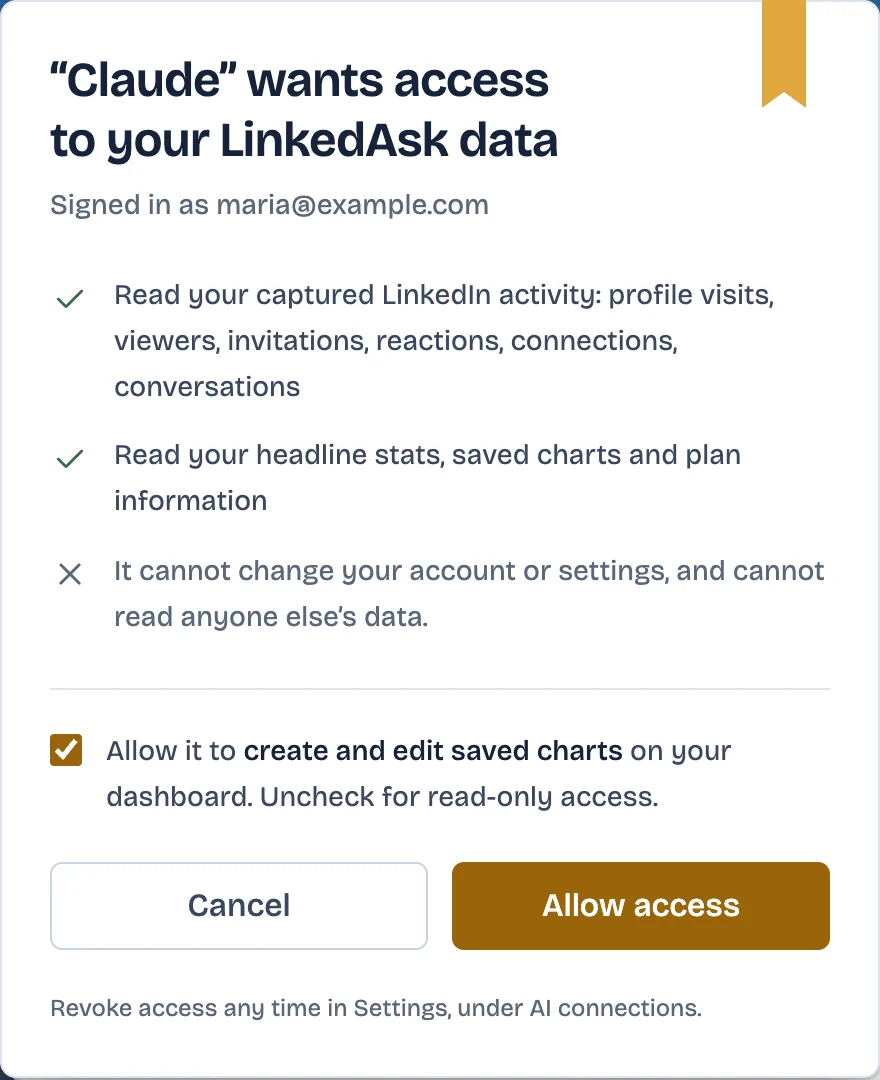
Anthropic's help page on custom connectors lists them on every Claude plan as of October 2026, and a Free account gets one. The same page names Claude Desktop and Cowork alongside Claude on the web. On Team and Enterprise plans an Owner or Primary Owner adds the connector, and Enterprise also lets people with a custom role that includes Manage access to Libraries add it. You then connect it from Customize › Connectors with your own LinkedAsk sign-in.
The bring your own AI page covers the connection for each AI tool LinkedAsk works with. You can cut Claude off at any time under Settings › AI connections in LinkedAsk.
First questions to ask Claude
Start with this week. Claude works from the extension's record, so a question about last spring comes back empty if you installed LinkedAsk on Monday. Claude names the tool it calls while it works, as in the last column.
| Ask Claude | What it reads | Tool Claude calls |
|---|---|---|
| Who viewed my profile this week? | The viewers LinkedIn showed you, each with LinkedIn's rough time such as "2h ago". Hidden viewers stay anonymous. | list_profile_viewers |
| Whose profiles did I open twice this week without sending an invite? | Your profile visits, checked against the invites the extension saw you send. | list_profile_visits, list_invites_sent |
| Which of my invites from the last 7 days are still pending? | Each invite you sent, with its status such as pending or accepted. | list_invites_sent |
| Who do I owe a reply? | Your message threads with people you saved, and who wrote last in each. | list_saved_people, list_conversations |
| How did my last post do? | LinkedIn's numbers for your post on each day the extension read them. | list_posts, get_post |
For one person, type "What do I know about" and their name. Claude looks them up and lays out the history between you, from profile visits in both directions to your private note.
Using ChatGPT instead
ChatGPT takes the same URL through its Plugins screen. OpenAI gives Business and Enterprise/Edu full support and lets Pro users connect read-only. The setup is in connect ChatGPT to LinkedIn, and can ChatGPT access LinkedIn compares every route into LinkedIn data.
Claude and LinkedIn: questions
Can Claude connect to your LinkedIn?
Yes, through a custom connector you add yourself. LinkedIn has not published one for Claude, as of October 2026, so you choose a third-party connector by the data you want Claude to use.
How do I connect Claude to LinkedIn for free?
Claude Free allows one custom connector. Spend that slot on LinkedAsk if your own LinkedIn history is what you want to ask about. LinkedAsk's plans are on its pricing page.
How can I get Claude to read my LinkedIn profile?
Paste the text of your profile into a chat, which works on any plan. On a paid plan, Claude in Chrome can read your profile page while you have it open.
Is there a Claude MCP for LinkedIn?
Yes, from third parties. LinkedIn hasn't published one as of October 2026. Official-API servers post for you, and LinkedAsk reads the activity its extension recorded. The LinkedIn MCP guide compares them.
Does the LinkedIn connector work in the Claude desktop app?
Yes. Anthropic lists custom connectors for Claude Desktop and Cowork as well as Claude on the web.
Keep reading
- Guide · 5 minLinkedIn MCP: what it is and what it can readA LinkedIn MCP lets Claude or ChatGPT use LinkedIn data. Six kinds side by side by data source, what each reads and does, and where LinkedIn's ChatGPT app fits.
- Guide · 3 minFind warm introductions on LinkedIn with AIPrompts that find who you know at a company, rank them by your last message, and draft the request, with the LinkedIn data each prompt reads.
- Guide · 4 minWho to follow up with on LinkedIn: AI promptsPrompts that rank who to message on LinkedIn today, from replies you owe to profile viewers worth a hello. Each one says what data it needs and where to get it.
Ask Claude about your LinkedIn.
Add the extension, then one URL in Claude. Ask about your visits, your invites and the people who viewed you, from the install on.