LeadDelta vs LinkedAsk: a team CRM or a personal one
Anna Sheronova · Updated November 8, 2026
LeadDelta and LinkedAsk both work on top of LinkedIn and do different jobs. LeadDelta turns your connections into a CRM a team can share, finds emails and phone numbers, and runs an AI inbox and outreach campaigns. LinkedAsk keeps a dated record of your own LinkedIn activity (profiles you visited, who viewed you, invites, connections and messages with people you save) and lets you ask questions about it in its chat or in Claude and ChatGPT. Pick LeadDelta to work your network as a sales team. Pick LinkedAsk to remember what happened on your LinkedIn.
Who each one is for
LeadDelta says it is for founders, sales teams, recruiters, coaches, consultants and agencies. Its Chrome Web Store listing adds marketers and executives. The product leans toward selling: contact data, lead lists, campaigns and shared team workspaces.
LinkedAsk is built for one person working their own network: solopreneurs, job seekers, coaches and sellers. It has no team sharing and no outreach. Its work is to keep what LinkedIn shows you once and then drops.
What each one keeps
| What | LinkedAsk | LeadDelta |
|---|---|---|
| Your connections | The ones it has seen, with the day you connected when LinkedIn showed one | All 1st-degree connections, synced into a workspace |
| Who viewed your profile | Every viewer LinkedIn showed you, kept past LinkedIn's window | Not listed on its product pages |
| Profiles you visited | Each visit, with name, headline and date | Not listed on its product pages |
| Invites you sent | Each one with its date, accepted or pending | Not listed on its product pages |
| Messages | Date and first line, for people you saved | Every LinkedIn message in an AI inbox, with drafted replies |
| Notes, tags, follow-ups | Private note and a follow-up signal per saved person, no tags | Notes, bulk tags, tasks and reminders |
| Emails and phone numbers | No | Business and personal, found with credits |
| Sending messages | No, you write on LinkedIn yourself | Personalized messages at scale and campaigns |
| Team sharing | No, one person's account | Shared workspace and warm intros through teammates |
| Export | CSV for every list | CSV, with enriched contact data |
| AI | Chat with charts, MCP for Claude, ChatGPT, Cursor, Claude Code | AI inbox drafts, MCP for Claude, ChatGPT, Perplexity |
- Your connections
- LinkedAsk
- The ones it has seen, with the day you connected when LinkedIn showed one
- LeadDelta
- All 1st-degree connections, synced into a workspace
- Who viewed your profile
- LinkedAsk
- Every viewer LinkedIn showed you, kept past LinkedIn's window
- LeadDelta
- Not listed on its product pages
- Profiles you visited
- LinkedAsk
- Each visit, with name, headline and date
- LeadDelta
- Not listed on its product pages
- Invites you sent
- LinkedAsk
- Each one with its date, accepted or pending
- LeadDelta
- Not listed on its product pages
- Messages
- LinkedAsk
- Date and first line, for people you saved
- LeadDelta
- Every LinkedIn message in an AI inbox, with drafted replies
- Notes, tags, follow-ups
- LinkedAsk
- Private note and a follow-up signal per saved person, no tags
- LeadDelta
- Notes, bulk tags, tasks and reminders
- Emails and phone numbers
- LinkedAsk
- No
- LeadDelta
- Business and personal, found with credits
- Sending messages
- LinkedAsk
- No, you write on LinkedIn yourself
- LeadDelta
- Personalized messages at scale and campaigns
- Team sharing
- LinkedAsk
- No, one person's account
- LeadDelta
- Shared workspace and warm intros through teammates
- Export
- LinkedAsk
- CSV for every list
- LeadDelta
- CSV, with enriched contact data
- AI
- LinkedAsk
- Chat with charts, MCP for Claude, ChatGPT, Cursor, Claude Code
- LeadDelta
- AI inbox drafts, MCP for Claude, ChatGPT, Perplexity
LeadDelta's product pages do not list profile viewers, a history of profiles you visited, or tracking for invitations you sent (as of November 2026). Those are the parts of LinkedIn activity LinkedAsk was built around.
Connections and the date you connected
LeadDelta imports your 1st-degree connections into a workspace. Each time you open LeadDelta it syncs new connections, flags people who left and picks up profile changes. You can tag connections in bulk, add notes, set follow-ups and filter by title, company, location and last interaction.
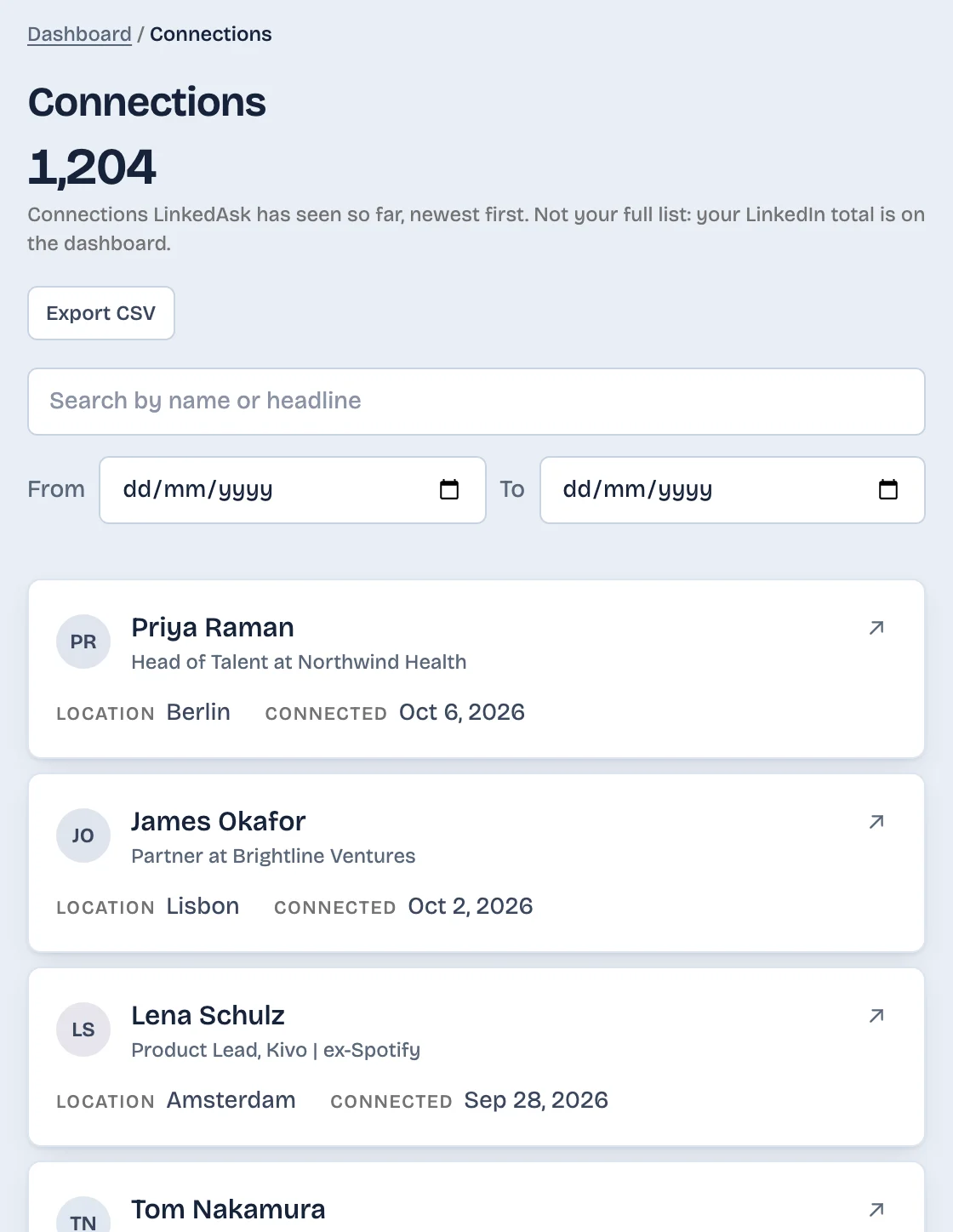
LinkedAsk's Connections list holds the connections it has seen in Chrome on your computer, newest first, with the day you connected when LinkedIn showed one. It is not your full LinkedIn list, and it starts the day you install it.
If you only need the date for one person, you may not need either tool. See when you connected with someone on LinkedIn covers the three places LinkedIn itself shows it.
Messages and follow-ups
LeadDelta's Smart Inbox brings all your LinkedIn messages into one place, including Sales Navigator conversations. It labels each new message (Introductions, Awaiting reply, Action items) and drafts replies in your voice from your past conversations. You edit and send. LeadDelta can also send personalized messages to many people at once and run LinkedIn and email campaigns.
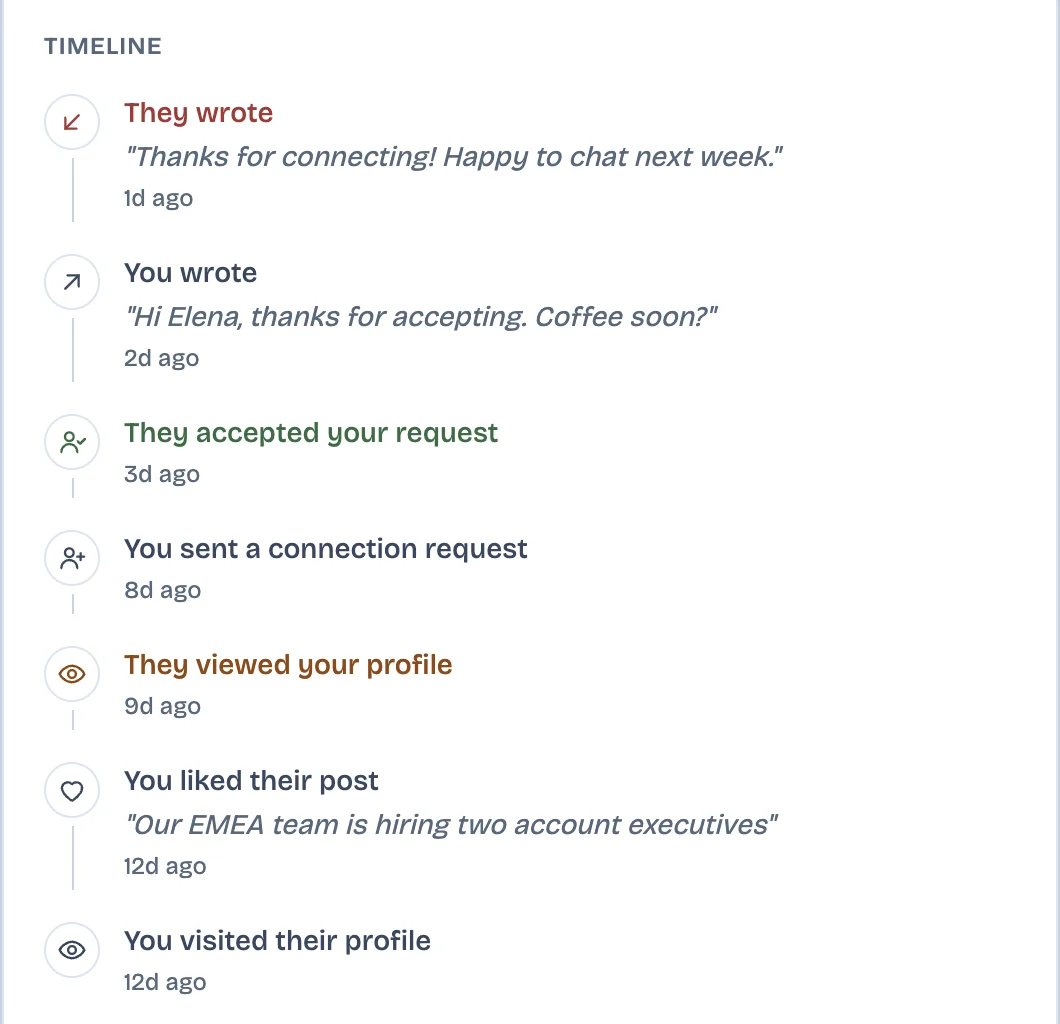
LinkedAsk does not touch your inbox and does not write or send anything. You save the people who matter to your watchlist, and each one gets a card with every visit, invite, reaction and message between you, your private note, and a signal such as "They viewed you" or "Reply to them". It keeps messages only for people you saved, from the day you saved them, with the date and the first line.
Contact data and team features
This is where LeadDelta does things LinkedAsk does not do at all. LeadDelta finds business and personal emails and phone numbers through waterfall enrichment, paid for in credits. Its sidebar captures people from LinkedIn search, Sales Navigator and event attendee lists into lead lists. A team can pool everyone's connections into one workspace, and Warm Intro AI looks for a path to a prospect through a teammate. It also alerts you to job and company changes and syncs with HubSpot, Zapier and Make.
LinkedAsk has none of these: no email or phone finder, no shared workspace, no CRM sync. Its New role signal shows only when someone on your watchlist changed their headline between two of your visits.
Import, export and AI
Both export to CSV. In LeadDelta you export to CSV at any time, enriched with the contact data you found, and you can import contacts. In LinkedAsk every list (visits, viewers, reactions, invites, connections, followers) has its own Export CSV button. LinkedAsk's free connections analyzer reads the Connections.csv file from your LinkedIn data export.
Both connect to AI assistants over MCP. LeadDelta's MCP server works with Claude, ChatGPT and Perplexity and reads your synced connections, with tags, notes and enriched fields. LinkedAsk's works with Claude, ChatGPT, Cursor and Claude Code and reads your recorded activity: who viewed you, whom you visited, which invites were accepted. When you ask, it can also save people, write notes and save charts. LinkedAsk has its own chat as well, which answers questions like "what share of my invites were accepted this month" with a chart.
Where LeadDelta is stronger
LeadDelta has been around longer and more people use it. Its Chrome extension lists 10,000 users and a 4.8 out of 5 rating from 114 ratings (as of November 2026). It is the better pick if you sell as a team, need emails and phone numbers, want an inbox that drafts replies, or want your LinkedIn contacts in HubSpot.
LinkedAsk is the better pick if you want to know who viewed you and whom you visited months later, see which invites turned into connections, and ask an AI about your own LinkedIn history. It keeps nothing from before you install it and works in desktop Chrome only.
Both publish their plans on their own pages: LeadDelta pricing and LinkedAsk pricing.
Questions
What is the difference between LeadDelta and LinkedAsk?
LeadDelta is a CRM for your LinkedIn connections that a team can share, with email and phone finding, an AI inbox and outreach campaigns. LinkedAsk keeps a dated record of your own LinkedIn activity, like profile viewers, profiles you visited and invites you sent, and lets you ask questions about it.
Does LeadDelta show who viewed my LinkedIn profile?
Its product pages do not list profile viewers as of November 2026. LinkedAsk saves each viewer LinkedIn shows you, so the list keeps growing after LinkedIn drops the names. Anonymous viewers stay anonymous.
Can LinkedAsk find email addresses or phone numbers?
No. LinkedAsk keeps your LinkedIn activity and has no contact data finder. LeadDelta finds business and personal emails and phone numbers with credits.
Do both connect to Claude and ChatGPT?
Yes, over MCP. LeadDelta's server reads your synced connections with tags, notes and enriched fields. LinkedAsk's reads your recorded LinkedIn activity, such as who viewed you and which invites were accepted.
LeadDelta is a trademark of its respective owner. LinkedAsk is not affiliated with or endorsed by LeadDelta. Facts about LeadDelta come from its own public pages as of November 8, 2026.
Start capturing your LinkedIn activity
Install the extension and every profile you open from now on stays findable.