How to tell if someone removed you on LinkedIn
Anna SheronovaUpdated
LinkedIn does not notify you when someone removes you as a connection, and its help pages describe no list of the people who did, as of October 2026. On that person's profile, the degree next to their name no longer reads 1st. To find everyone who is gone, compare two exports of Connections.csv from different dates. A name in the older file and missing from the newer one points to a connection that ended, without saying who ended it.
- sent to you when a connection removes you
- No notice
- the degree that is gone from their profile after a removal
- 1st
- in Connections.csv, none of them about removals
- 7 columns
Connections.csv comes in LinkedIn's data download, and what the LinkedIn data export gives you covers the whole archive. If you are the one removing someone, how removing a LinkedIn connection works covers that side.
Tell if one person removed you
Open the profile of the person you think removed you, or unconnected with you, and read the degree next to their name. LinkedIn puts a 1st degree icon next to the name of everyone you're connected to, in search results and on their profile. After a removal the two of you are no longer 1st-degree connections, so the icon no longer reads 1st. If it now reads 2nd, LinkedIn Help says you can invite that member with the Connect button on their profile.
LinkedIn sends no message when a connection removes you. LinkedIn's steps for removing a connection say: "When you remove a connection, they won't be notified."
Degree next to their name
Connected1st
After the connection endsChanges: No longer 1st
Your Connections page
ConnectedListed
After the connection endsGoes: Not listed
Recommendations and endorsements between you
ConnectedShown
After the connection endsGoes: Withdrawn
Your Connections page (My Network, then Connections) has a Search by name bar, and a removed connection no longer comes up there. How to see all your LinkedIn connections has the path on each device. Any recommendation or endorsement between the two of you is also withdrawn when the connection is removed, so one they gave you is gone from your profile.
Why a LinkedIn connection disappears
A removal by the other person is one cause among several. The profile column below is from LinkedIn Help as of October 2026. The file column follows from the Connections file listing 1st-degree connections only.
| What happened | Their profile, as you see it | Your next Connections.csv |
|---|---|---|
| They removed you | Opens. The degree is no longer 1st | No row for them |
| You removed them | Opens. The degree is no longer 1st | No row for them |
| They closed their account | No longer visible on LinkedIn | No row. Closing an account deletes its connections |
| One of you blocked the other | You can't open each other's profiles | No row. A block ends the connection |
| They hibernated their account | Not visible to anyone, connections included | LinkedIn Help does not say |
The last three rows come from LinkedIn's pages on closing an account, blocking a member and hibernating an account.
If a former connection's profile opens and the degree is no longer 1st, that points to a removal, by them or by you. If it no longer opens, the causes LinkedIn Help describes are a closed account, a hibernated account or a block, and nothing you see tells them apart.
When many connections look gone at once, LinkedIn's Missing connections page names another cause, a second account you opened by mistake.
Find lost connections with two Connections.csv files
Two Connections.csv files saved on different dates show whose row went missing in between. LinkedIn's Connections file lists all your 1st-degree connections, each with a name, profile URL, email address where shared, company, position and connection date, and anyone you're no longer connected to has no row.
As of October 2026, Connections comes in the larger data archive, which LinkedIn says is emailed within 24 hours. In my own archive, requested October 2, 2026, the first ZIP with Connections.csv arrived within minutes. That is one account on one day. The request steps are in how to export your LinkedIn connections to a CSV.
Save today's file
Request the archive, download the ZIP and keep Connections.csv with the date in its name, for example Connections 2026-10-11.csv.
Export again later
Request a new archive after a month, or whenever the question comes up, and save that file the same way.
Put both in one spreadsheet
Give each file its own tab, named Old and New. In Google Sheets, import each file into a new sheet. In Excel, copy the rows of one file into a second sheet of the other. In my file three lines sat above the header, so delete those in each tab until row 1 starts with First Name.
Match on the profile URL
In the Old tab, in row 2 of the first empty column, type =COUNTIF(New!C:C, C2) and fill it down. Column C is URL. A 0 means that profile URL is not in the newer file. Rows with an empty URL cannot be matched, so skip them whatever they show. In my file from October 2, 2026 those rows held only a date, no name.
Check each name on LinkedIn
Filter the Old tab to the rows that show 0. Look each person up by name in the New tab first, then open their profile and read the degree.
Step 5 is there because a member can change their profile URL, up to five times in six months as of October 2026. A person with a new URL shows 0 and is still connected to you. If the dates or columns come in garbled, importing LinkedIn connections into Google Sheets covers a clean import.
If you only want to know whether one person is in today's file, drop Connections.csv or the whole ZIP into the LinkedIn connections analyzer and type their name in its search box. It skips the notes lines for you and can download a cleaned CSV without them. It reads one file at a time, so the comparison stays in the spreadsheet.
What two Connections.csv files cannot tell you
Comparing two Connections.csv files gives a list of people whose row is gone. It leaves these open:
- Who ended it. The file has no column for it, and a missing row looks the same whoever ended the connection.
- Anything before your first saved file. The file lists current connections only, so the comparison starts with the oldest file you kept.
- The day it happened. You learn it happened between the two request dates. A shorter gap gives a tighter window.
- Hibernated accounts. LinkedIn Help does not say whether they keep their row.
Keep what you know about each connection
Connections.csv shows whose row is gone. It has no record of your own activity with that person, such as the day you last opened their profile.
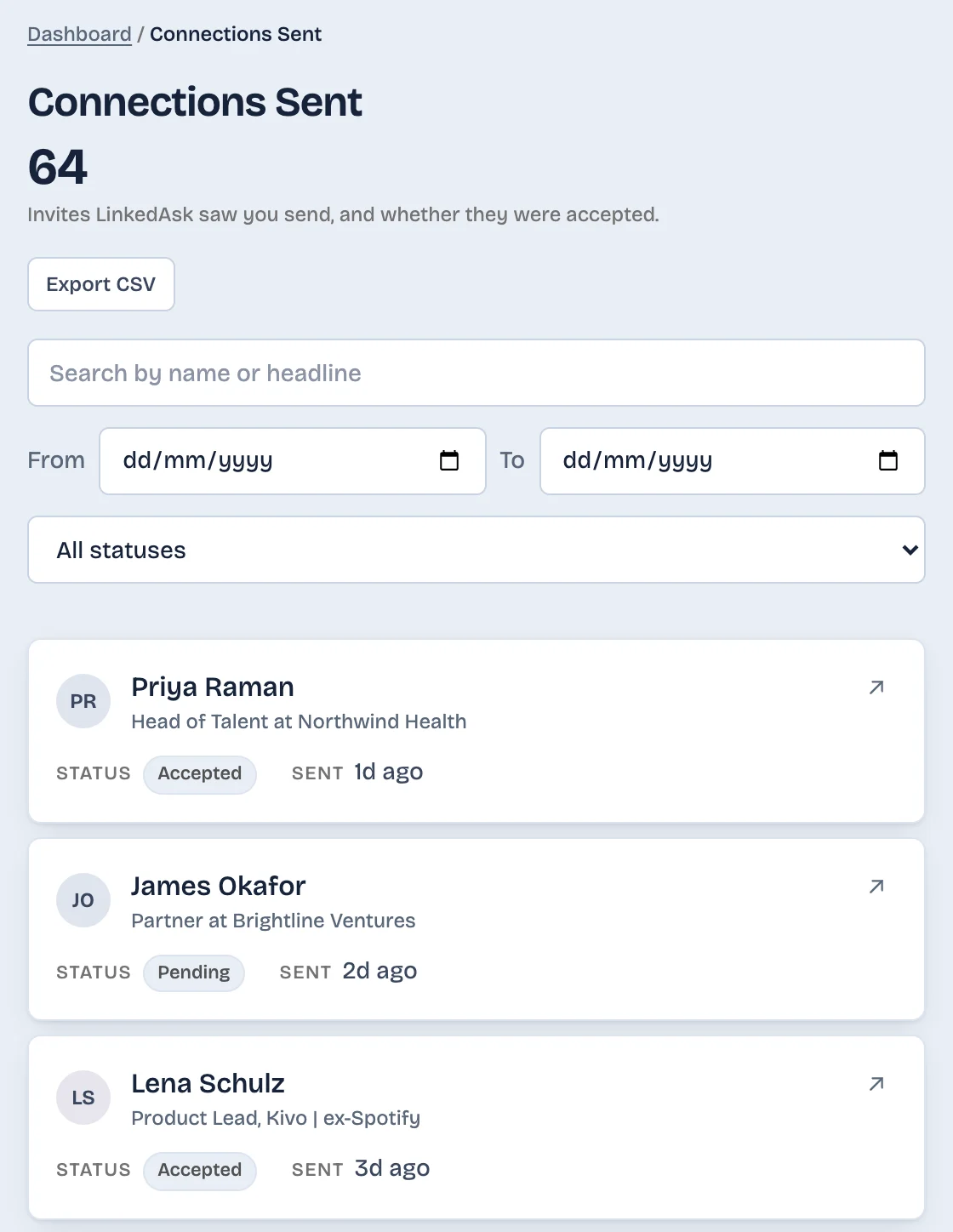
LinkedAsk's activity history is one way to keep that. LinkedAsk is a Chrome extension that works as a memory for your own LinkedIn and a personal CRM on top of it. From the day you install it, it keeps a dated record of the profiles you visit, the invitations it sees you send and whether they were accepted, and the day each person connected when it sees your Connections page. You can search each list by name and export it as a CSV. After a connection ends, the invitation you sent stays in the history with its date.
What to do next
- One person in mind: open their profile and read the degree.
- The number dropped and you want names: run the comparison if you have an older Connections.csv. If you have none, request the archive today and compare next month.
- Their profile no longer opens: a closed account, a hibernated account and a block all look like this to you.
- You want to catch it from now on: export on a fixed day each month and keep every file.
Removed connections: questions
Does LinkedIn notify you when someone removes you as a connection?
No. LinkedIn Help says that when a connection is removed, the other person is not notified. You find out by looking, when the degree next to their name no longer reads 1st or their name is gone from your connections.
Can you see who unconnected with you on LinkedIn?
Not on LinkedIn. Its help pages describe no list of people who removed you or disconnected from you, as of October 2026. You can build one yourself by comparing two exports of Connections.csv from different dates. Names in the older file and missing from the newer one point to connections that ended, though the file does not say who ended each one.
Am I blocked on LinkedIn?
Nothing on LinkedIn confirms it. After a block, LinkedIn Help says the two of you can't open each other's profiles and are no longer connected. A profile that no longer opens can also mean a closed or hibernated account. If it still opens and the degree is no longer 1st, that points to a removal.
How do I see previous connections on LinkedIn?
LinkedIn lists current connections only, on the Connections page and in the Connections file of your data export. Past connections appear in neither. An older Connections.csv that you saved still lists them, with the date you connected.
Keep reading
- Guide · 3 minLinkedIn data export: what's inside each fileHow to request your LinkedIn data export, when each part arrives, and what's in each CSV. Plus five things it never includes, like who viewed you.
- Guide · 5 minImport LinkedIn connections to Google SheetsImport LinkedIn's Connections.csv into Google Sheets with File, Import, then delete the notes above the header and check that Connected On sorts by date.
- Guide · 4 minSee when you connected with someone on LinkedInThree places that can show when you connected on LinkedIn: the person's Contact info, your Connections page, and a date column in your data export.
Keep a dated record of your connections.
Install the extension. It keeps the profiles you visit, the invitations you send and the connections it sees in Chrome on your computer, each with a date.