Export LinkedIn connections to CSV: what's in it
Anna SheronovaUpdated
To export your LinkedIn connections, request your data archive on a computer: Me, Settings & Privacy, Data privacy, Get a copy of your data, then Download larger data archive. As of October 2026, LinkedIn says the larger archive is emailed within 24 hours, and my account had no Connections-only option. The archive holds Connections.csv with seven columns: First Name, Last Name, URL, Email Address, Company, Position and Connected On. LinkedIn fills Email Address only for connections who allow it.
- for LinkedIn to email the larger data archive
- Within 24 hours
- that the download link works
- 72 hours
- in Connections.csv
- 7 columns
The same archive carries your messages and invitations, and what the LinkedIn data export gives you lists every file in it. To look through your contacts on LinkedIn itself, see how to see all your LinkedIn connections.
How to export your LinkedIn connections, step by step
Make the request on a computer. LinkedIn says the data download is currently not available on mobile.
Open your settings
Click the Me icon at the top of LinkedIn, then Settings & Privacy.
Open Get a copy of your data
Click Data privacy. The row is under How LinkedIn uses your data. One LinkedIn help page calls it Download your data.
Choose the larger archive
Select the option that starts with Download larger data archive, including connections.
Request it
Press Request archive.
Download from the email
LinkedIn sends a link to your primary email address. Download the ZIP while the link works.
Find the file
Unzip the download and open Connections.csv.
Where LinkedIn's Connections export option went
The export still works, because the larger archive includes the connections file. As of October 2026, the "Want something in particular?" list on LinkedIn's export page had no Connections box on my account. I checked on October 2 and October 11, 2026, and it offered Articles, Invitations, Profile, Recommendations and Registration.
How long the LinkedIn download takes
As of October 2026, LinkedIn says the larger data archive is emailed within 24 hours and stays available for download for 72 hours. I requested my own archive on October 2, 2026, and the first ZIP arrived within minutes with Connections.csv already in it. A second ZIP with the rest of the archive came the next day. That is one account on one day, so plan for the 24 hours.
After 72 hours, request the archive again.
What is in Connections.csv
Connections.csv has one row per 1st-degree connection and seven columns. LinkedIn describes the file as holding "the first and last name, public profile URL, email address, company, position, and connection date for all 1st degree connections".
| Column | What it holds | What to expect |
|---|---|---|
| First Name, Last Name | In the fileThe person's name | Two separate columns |
| URL | Some blankThe address of their LinkedIn profile | Blank on some rows in my file |
| Email Address | Mostly blankTheir email, if they allow connections to download it | Mostly blank in mine |
| Company, Position | In the fileTheir company and position | Two separate columns |
| Connected On | In the fileThe date you connected | Written like 01 Oct 2026 |
In my file from October 2, 2026, three lines of notes about hidden email addresses sit above the header row. Delete them, or have your spreadsheet skip them, before you sort or import. Importing LinkedIn connections into Google Sheets covers opening the file cleanly, in Sheets or Excel. To find one person's date, see when you connected with someone on LinkedIn.
Why emails are missing from the export
Each connection decides whether their email goes into your file. In LinkedIn's words, "members choose in their privacy settings whether to allow others to download their email address". The switch is in their Email visibility setting, where a member can allow connections to download their primary email in data exports.
Nothing in your own settings fills the blanks. In my own archive, requested October 2, 2026, most rows had no email address. To reach one person, message them on LinkedIn.
What Connections.csv leaves out
- Phone numbers. LinkedIn's description of the file lists none, and my file has no such column.
- Notes you wrote on people. The archive has a separate category for them, Premium Connection Notes. In my ZIP it is Notes.csv.
- People beyond your 1st degree. LinkedIn says you "currently can't export a list of your contacts that aren't 1st-degree connections".
- People who are no longer connections. The file lists who you are connected to on the day of the download. Finding removed LinkedIn connections shows how to compare two exports.
- Headline and location. The header row has no column for either.
Two free tools that read the file
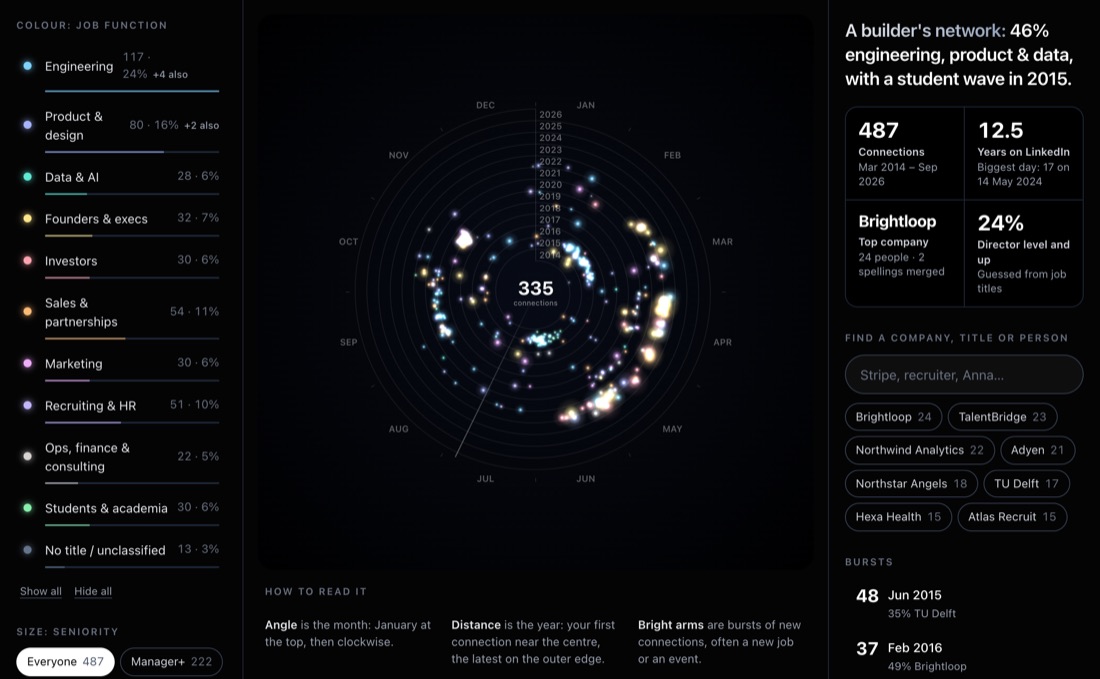
The LinkedIn connections analyzer draws every connection by the month and year you connected and shows your totals. To pull everyone at one employer, search your connections by company, with each person's title and the date you connected.
A record that builds from now on
The file shows who you are connected to and when you connected. The profiles you looked at and the people who viewed you are not in it.
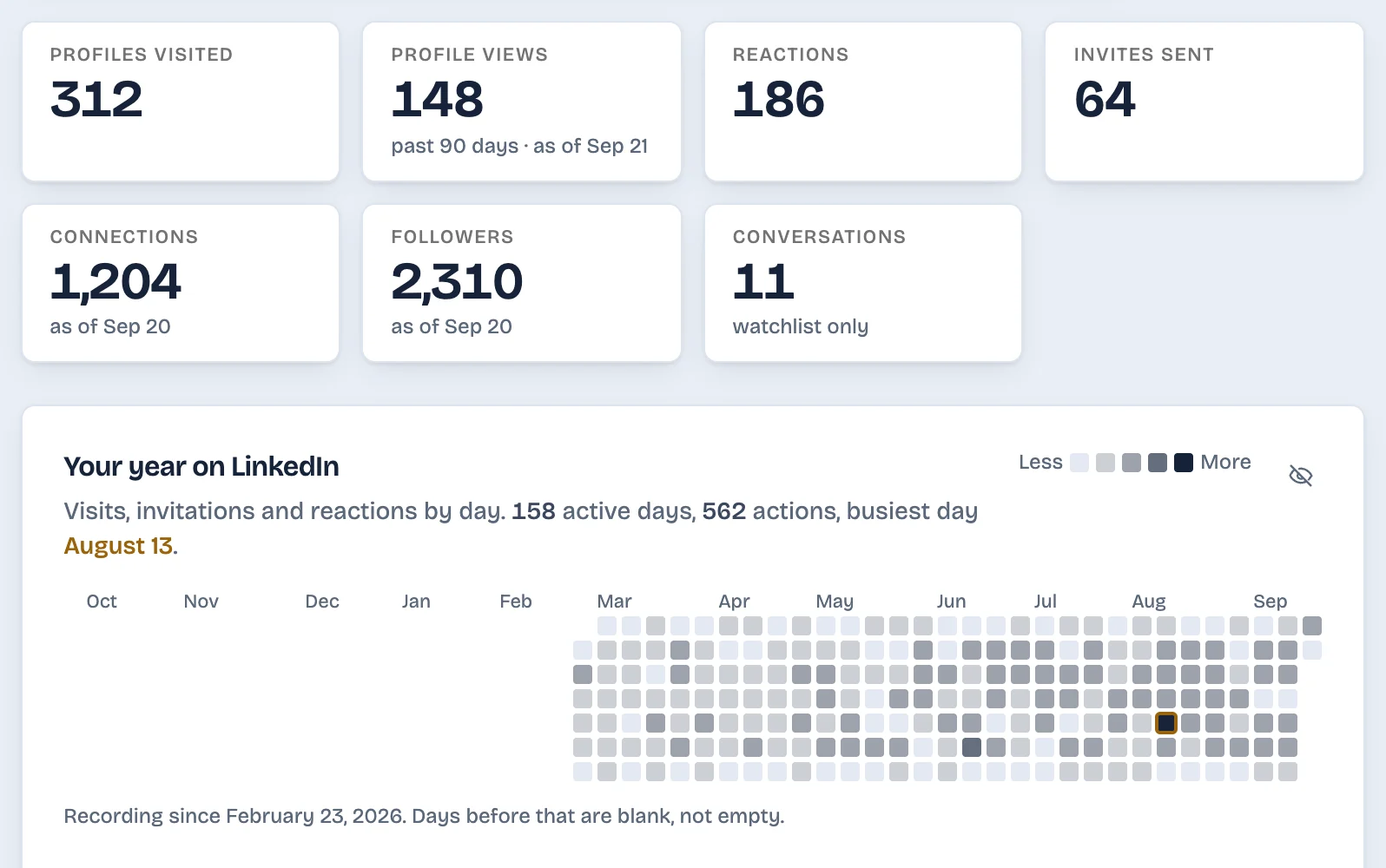
If you want those kept as they happen, LinkedAsk's activity history is one option. LinkedAsk is a Chrome extension that keeps a dated record of your own LinkedIn activity from the day you install it: profiles you visited, invites you sent and whether they were accepted, reactions, viewers and the connections it has seen. You can search each list, filter it by date and export it as CSV.
What to do next
- You need the list today: request the larger archive now. LinkedIn says the email comes within 24 hours.
- You want to see who leaves your network: export again on a fixed day each month and keep every file.
Export LinkedIn connections: questions
Can you export all of your LinkedIn connections?
Yes, all your 1st-degree connections. LinkedIn says the Connections file covers all of them, and it comes inside the larger data archive. People beyond your 1st degree cannot be exported, and people who are no longer connected to you have no row.
Can I export only my connections from LinkedIn?
Not as of October 2026, on the account I checked. LinkedIn's list of single categories offered Articles, Invitations, Profile, Recommendations and Registration. Choose the larger data archive and take Connections.csv out of the ZIP.
Can I export LinkedIn connections on an iPhone?
No. As of October 2026, LinkedIn says its data download is not available on mobile. Make the request on a computer, and the download link arrives by email.
Does the LinkedIn connections export include phone numbers?
No. LinkedIn's description of the Connections file lists name, profile URL, email address, company, position and connection date. Phone numbers appear in the archive for contacts you imported and for your own account.
Keep reading
- Guide · 3 minLinkedIn data export: what's inside each fileHow to request your LinkedIn data export, when each part arrives, and what's in each CSV. Plus five things it never includes, like who viewed you.
- Guide · 5 minImport LinkedIn connections to Google SheetsImport LinkedIn's Connections.csv into Google Sheets with File, Import, then delete the notes above the header and check that Connected On sorts by date.
- Guide · 5 minHow to tell if someone removed you on LinkedInLinkedIn never tells you when someone removes you. Two quick checks show if a person unconnected, and one shows everyone who left your network.
Keep what happens after you connect.
Install the extension. It keeps a dated record of the profiles you visit, the invites you send and the connections it sees, and each list exports as CSV.